
Forum rules
Oekaki posts must follow our Rules for the Site and Forum,
including the Oekaki Rules and Art Rules.
Having trouble using oekaki? Check out the Oekaki Guide or send in a help ticket.
Oekaki posts must follow our Rules for the Site and Forum,
including the Oekaki Rules and Art Rules.
Having trouble using oekaki? Check out the Oekaki Guide or send in a help ticket.
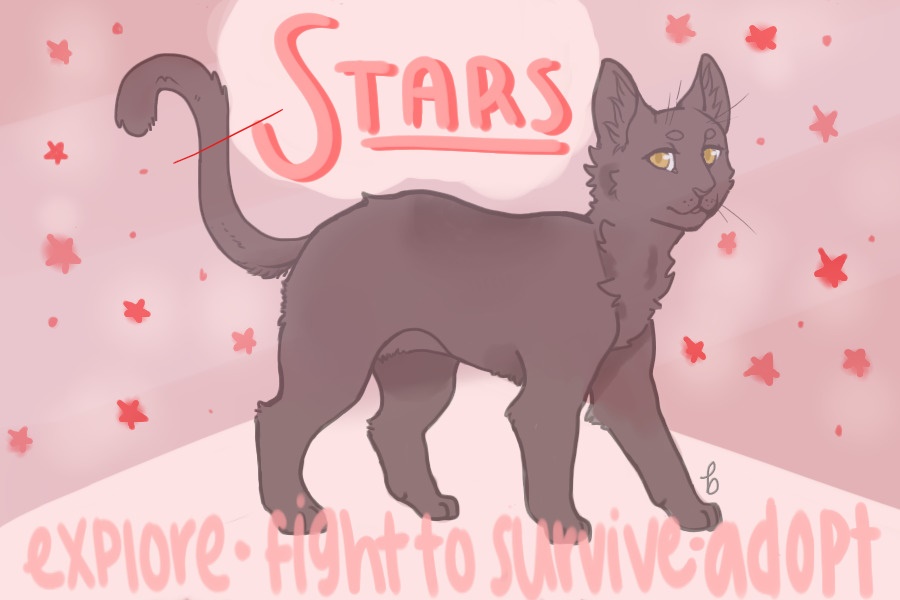
Stars V.2 • MYO by I Like Bees

| Based on | Click to view |
| Artist | I Like Bees [gallery] |
| Time spent | 4 hours, 14 minutes |
| Drawing sessions | 12 |
| 107 people like this | Log in to vote for this drawing |
Versions of this drawing that people have created recently


Stars V.2 • MYO
 by I Like Bees » Thu May 06, 2021 2:17 pm

[ Main Thread • Fanclub • Archive • FAQ • Nursery • Quests • Prompts • Explore • Artist Search • Edits • Readopts • Discord ]
Visit Starclan's Shop to purchase MYO tickets and edit items!
──────────────────────────────────────────────────────────────────────────────
- Rules.
1. Please follow the guidelines in the coat guide and on the edits list.
2. You may have someone make your MYO for you. They will need to post here and request to be added.
3. Your cat is not real until an admin approves them. You may not use unapproved MYOs or any unapproved cat on our bases. This includes, but is not limited to: uploading unapproved references to your archive, using unapproved cats in official Stars mechanics, using unapproved on-base references to commission or request artwork before approval, etc. Adding a "fake" sign or disclaimer does not overrule this. The Stars lines are not a F2U base and references must go through official approval channels before use.
4. You may only submit 1 MYO for approval per calendar month. This slot always counts for the owner of the cat and not the user who designed the cat. Staff may exchange their monthly staff litter slot for an extra MYO submission slot.
- 4a. Designing a MYO for someone as a gift will use the gift receiver's slot, even if you provide the items. Be sure to ask for permission before gifting someone a new MYO, as you will be using their monthly MYO slot.
4b. MYO submission slots cannot be gifted/transferred.
6. When posting an MYO it is a requirement that all items being used are currently listed on the official archive document.
7. Please label MYOs consecutively: #001, #002, etc.
8. You must fill out the proper forms!
9. Designs must be original pieces created by you (or you must have express permission from the artist who created them). Please include designer credit (if applicable) in your post as well as evidence of the designer's approval to transfer the design.
Disclaimer: The time taken to approve your MYO will differ, and MYOs posted after yours may be approved before yours is. Please be patient - we have not forgotten your MYO!
──────────────────────────────────────────────────────────────────────────────
- Code: Select all
[u]Username[/u]:
[u]Clan[/u]: (Please link)- Code: Select all
[b]Username:[/b]
[b]Clan:[/b] (Please link)
[b]MYO/Items using:[/b] (Must link to where items were obtained. All items MUST already be archived in the official archive document, or else you need to wait to post your cat)
[b]Coat Description:[/b]
[b]Edits:[/b] (Any edit the cat has, see here for list: https://www.chickensmoothie.com/Forum/viewtopic.php?p=128221717#p128221717)
[b]Obtained how?:[/b] (Quick description of where you obtained the items - trade, bought, found in explore, etc. Helps with quicker archiving)
- To be added to the page:
Posting your MYO (put this on your cat's page!):
Last edited by I Like Bees on Sat Jul 18, 2026 7:47 am, edited 207 times in total.
-

I Like Bees - Posts: 18194
- Joined: Sun Oct 29, 2017 7:50 am
- My pets
- My items
- My wishlist
- My gallery
- My scenes
- My dressups
- Trade with me
Stars V.2 • Off Oekaki Cats
by I Like Bees » Fri May 07, 2021 12:32 pm

- If you're interested in making or commissioning an off-Oekaki MYO, please visit the above thread for details, posting forms, and the approval process! Do not post off-Oekaki cats under Oekaki covers. The linked thread also covers edits to existing off-Oekaki cats - even if their approval is older and originally hosted on the main MYO thread.
Remember to link to your off-Oekaki cat's approval post when linking them in the nursery, explore, archive, etc.
Last edited by I Like Bees on Sat Jul 18, 2026 7:50 am, edited 9 times in total.
-
I Like Bees - Posts: 18194
- Joined: Sun Oct 29, 2017 7:50 am
- My pets
- My items
- My wishlist
- My gallery
- My scenes
- My dressups
- Trade with me
Stars V.2 • Edits
by I Like Bees » Fri May 07, 2021 12:40 pm

──────────────────────────────────────────────────────────────────────────────────
Please note that we do not allow parts of the Stars base to be traced or redrawn unless necessary for an edit.
This includes redrawing parts of the base to better match your edit style.
- NR
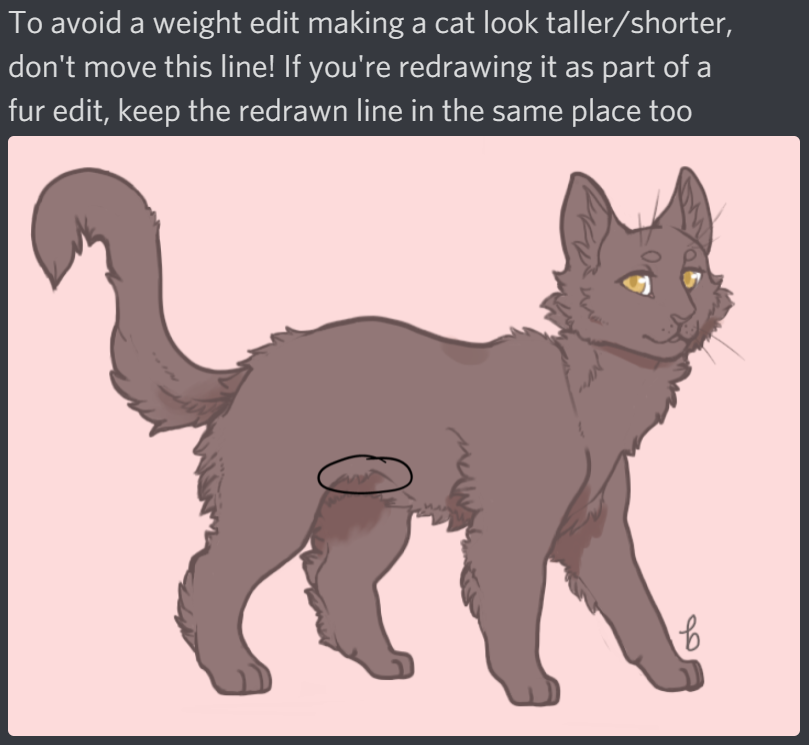
- Weight edits (noticeable change to fluff is a fur edit too [to avoid this, move the existing lines]; shouldn't change the cat's height)
Scars (includes torn/notched ears)
Claws (default or custom-drawn)
Expression edits (see this guide for details on NR expression vs common edits; includes thin/wide pupils)
Blind
Accessories (necklaces, feathers, plants, etc.; feathers behind the ears are not allowed)
Companions (fantasy companions are allowed; shouldn't be another domestic cat)
Missing or broken legs / eyes / ears / toes
- Tongue (sticking out of the mouth; visible with an open mouth expression isn't an edit; must be a natural cat shape)
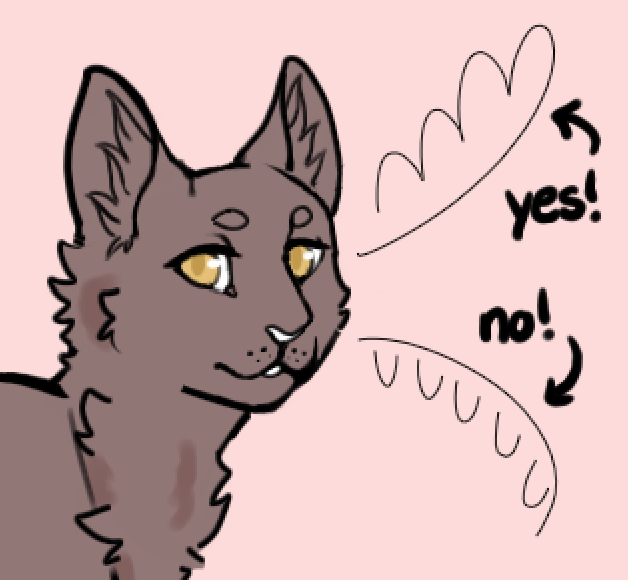
Whiskers (includes no whiskers; can be any appropriate shape, but must be one continuous line starting from the face [example])
Teeth/fangs
Pupil shape (thin/wide pupils are expression; no pupils is a pupil edit; no limit to what the shape can be, as long as it's appropriate)
Eye shape (see this guide for eye shape vs expression edits)
Eyelashes
Sclera color (can be any color and any number of colors and still grouped as just sclera color)
Ear placement (within reason; should just be rotated; here is an example of the approximate maximum rotation)
Pointed ears (cannot add any additional height, or they're considered tall ears as well)
Shorter tail (must be at least half the length of the regular tail; should move the original lines, or else adds a fur edit [example])
Ear tufts
Minimal fur edits (see this guide)
- Muzzle edits (any changes to the nose, nose bridge, or chin lines; see this guide for muzzle vs expression edits)
Unnatural eye colors (see list of Stars natural vs unnatural eyes here)
Round ears (should still be original ear height)
Long tail
Short ears (anything shorter than original ear height)
Heterochromia (different-colored pupils [excluding black, white, or a darker/lighter shade of the eye color] count; no limit to number of colors)
Medium fur edits (see this guide)
Paw shape (anatomically reasonable changes to the toe/paw lines; must be in the same pose with same visible number of toes unless polydactyl or missing toes; cannot change height; examples)
- Unusual coloring (pinks, purples, greens; includes nose/paw/whisker/skin color; see guidelines here)
Bob tail (less than half the original tail length)
No tail
Curled/kinked tails (curled tails cannot have a tail length edit listed no matter their visual length; see this guide)
Tall ears (anything taller than original ears; example of max ear height)
Folded ears
Curled ears
Polydactyly (counts as one edit regardless of how many paws are polydactyl)
Max fur edits (see this guide)
- Munchkinism
Reverse munchkinism
Split tail
Multiple tails (up to 3)
Double ears
Chimerism (combines two impossible coats)
Vitiligo (examples)
Pseudo merle (silver/smoke that stops working in some patches; examples [please note that not all examples on this page are pseudo merle])
Blue-ginger (examples [please note that not all examples on this page are blue-ginger])
Karpati (examples at the top of this page)
Brindled bicolor (tortie where the red-based pigment fails and turns white)
Finnish mutation / salmiak (examples, plus more here; recessive white spotting mutation and so cannot be paired with regular white)
Somatic mutation (mutates one allele in a small area of the coat; cannot be a legal tortie color combo; more info here)
──────────────────────────────────────────────────────────────────────────────────
- GUIDES
- To understand fur edits better, check out this slideshow!
To understand expression vs eye/mouth/muzzle edits better, check out this guide!
If you're applying a StarClan lines edit item, see the star's greetings item info here!
If you're looking into unnatural fur color in Stars, check out this guide!
To better understand curled tail edits, check out this guide!
Click here for a guide on mythical level edits in Stars!
Click here for a guide to unnatural markings/edits! More event-exclusive edit item info can be found here
- NOTES
- Please note that both ears should have the same height/shape edits. Ear scars, missing ears, and ear placement do not need to match.
Mixing the different fur length bases is not allowed. Base tails may be mixed with different base fur types (using the whole tail, not combining pieces of different tails) and are not a fur edit.
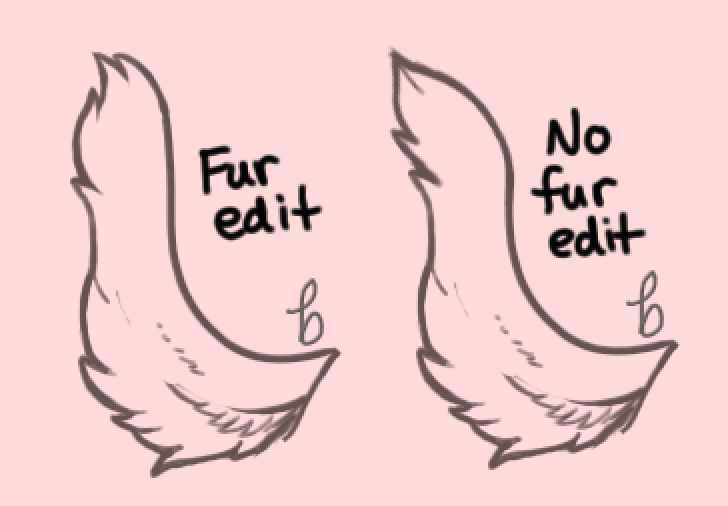
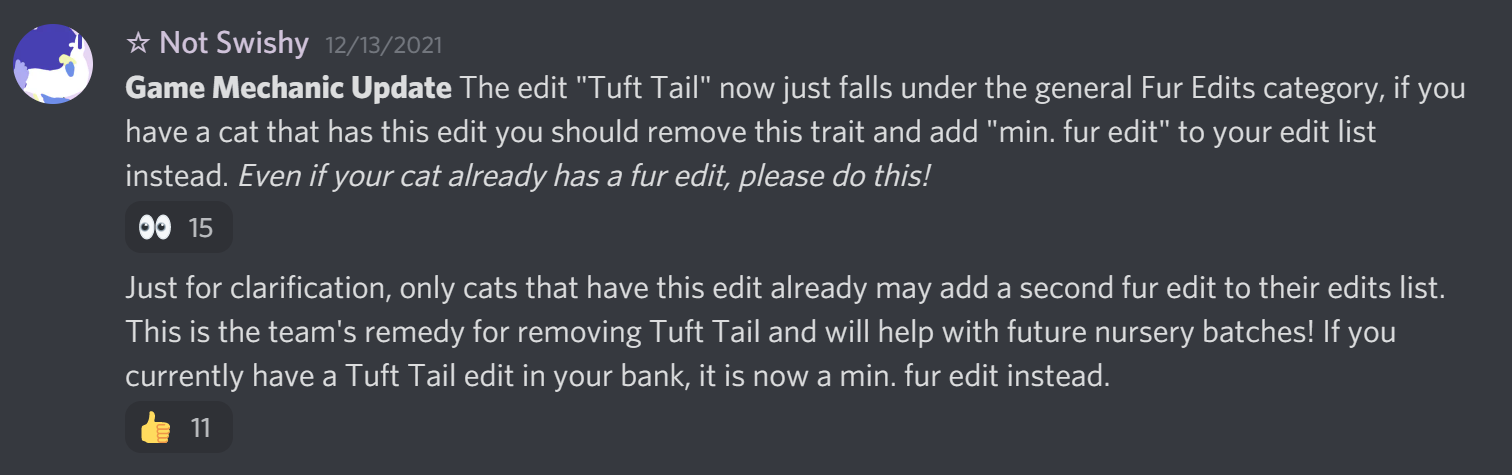
Due to previous edit retirements, cats with a tuft tail (UC) or sleek tail (C) edit on their edits list now roll for an additional min fur edit in litters.
Some retired myth edits may pass as a different myth edit now. This will be noted on the later posts of the cat's Oekaki page.
Contact an applicable community helper or admin for confirmation of rarity if unsure!
Last edited by I Like Bees on Wed Jul 08, 2026 11:34 am, edited 33 times in total.
-
I Like Bees - Posts: 18194
- Joined: Sun Oct 29, 2017 7:50 am
- My pets
- My items
- My wishlist
- My gallery
- My scenes
- My dressups
- Trade with me
Stars V.2 • FAQ
by I Like Bees » Fri May 07, 2021 12:43 pm

[ Main FAQ • Nursery FAQ • Archive FAQ • Off-Oekaki MYO FAQ • Quest Board FAQ • Prompts FAQ • Explore FAQ • Artist Search FAQ ]
- MANAGEMENT
Q: Where is the shop? Where do I buy MYO tickets and edit items?
A: All Stars items, including MYO tickets, are now sold in StarClan's shop! Purchase forms are posted directly on the archives using the "buying items" form.
Q: When is StarClan's shop restocked?
A: Typically somewhere around the first few days of the month! There isn't an exact schedule and restocks aren't always announced.
Q: Who can approve my MYO?
A: I Like Bees will be handling most MYO approvals! Occasionally, an admin or helper may assist with an approval as well ^^
Q: Can I buy MYOs with C$ / tokens / pets?
A: At the moment, MYOs and other items are only available for in-game currency (stardust). Items may not be traded for C$ either, unless they meet the limited exceptions from the trade rules on the archives.
Q: May I create a cat off-Oekaki?
A: Yes, you can find the info on our off-Oekaki MYO thread!
Q: I'm not added to the MYO cover! How do I make my cat?
A: Just post on this thread to ask to be added and I'll add you asap! ^^
Q: Can I transfer an existing design into Stars?
A: Yes! However, you must receive clear permission from the artist who created the design to transfer it into Stars, and provide this during the approval process. Additionally, you must include credit to the original designer in your post. Please keep in mind that the design may need to undergo changes to fit Stars guidelines.
EDITS
Q: Does my Common MYO (C MYO) get unlimited common edits?
A: Yes! All C MYO tickets have unlimited common edits.
Q: Does my Uncommon MYO (UC MYO) get unlimited common edits? Does my Rare MYO (R MYO) get unlimited uncommon and common edits?
A: Yes to both of these! All MYO tickets get unlimited edits of the rarities below the ticket rarity. For example, an uncommon MYO ticket gets unlimited common and NR edits.
Q: Can I add another edit to my cat after it's already been approved?
A: After a cat has been approved, you may not edit the design without applying the proper rarity edit item (you can buy these in StarClan's shop). All edits to existing approved cats must be applied via color-in and receive approval again. Be sure to fill out a "using items" form on the archives so your cat can be approved! You can find the full details regarding applying edits to an existing cat in the how to play post and main page FAQ.
Q: Where can I find info on a specific item?
A: Our regular item descriptions are in StarClan's shop, and our event-exclusive item info is hosted here!
GROWTHS
Q: Can MYOs be kits/apprentices?
A: Yes! You will be responsible for their growths, and the date that they can grow will be given when they're approved. Growths must be approved and can only be approved on or after their growth date! Please bump the thread, post in the Discord's #approval-for-myos channel, or reach out to someone to have your cat's growth approved.
Q: What should I do if I want to add an edit that will only appear on my cat's reference once the cat is grown?
A: When posting the original kitten/apprentice ref for approval, you should list every edit that your cat will have once growth. If something is not listed, we will assume your cat has the default lines, and you'll need to apply edit items for any new edits shown (or edits changed/removed!). NR edits don't need to be listed as they can be added/removed for free with approval.
Q: When can my MYO grow?
A: Your MYO can grow from kit to apprentice 3 weeks after the MYO was posted, and apprentice to warrior after an additional 3 weeks! If you skip the apprentice growth, your kit will still take 6 weeks to grow to a warrior. These growth dates go by the time your cat was posted, not the time they were approved. Growths cannot be approved until the day they are scheduled to grow.
Q: Can I post my MYO's growths in advance / during the approval process?
A: Yes! You're welcome to post all three (or two) growths at the same time, to ensure all their markings and edits are accurate and won't require future editing or use of edit items later down the line. Linking a clear image of the references to have them checked in advance is also fine! However, your cat's growths cannot be approved until the date(s) they're scheduled to grow, and you may not use their growths until the growths are approved!
Last edited by I Like Bees on Sat Jul 18, 2026 7:59 am, edited 17 times in total.
-
I Like Bees - Posts: 18194
- Joined: Sun Oct 29, 2017 7:50 am
- My pets
- My items
- My wishlist
- My gallery
- My scenes
- My dressups
- Trade with me
-
Sunnyside - Posts: 4918
- Joined: Mon Mar 28, 2011 8:42 am
- My pets
- My items
- My wishlist
- My gallery
- My scenes
- My dressups
- Trade with me
Re: Stars V.2 • MYO
by I Like Bees » Fri May 07, 2021 4:00 pm
Mark

✦ Stars ✦ Bagel ✦ TH ✦ hi ✦
✦ they/them ✦ CDT ✦
Buy my old adopts
✦ they/them ✦ CDT ✦
Buy my old adopts

-
I Like Bees - Posts: 18194
- Joined: Sun Oct 29, 2017 7:50 am
- My pets
- My items
- My wishlist
- My gallery
- My scenes
- My dressups
- Trade with me
Re: Stars V.2 • MYO
by Hush » Sun May 09, 2021 1:38 am
Mark
x
x
x
x
x
x
╔══════════════╗
xx
* id #256165
* Pantry Puffs
* Art shop
* Toyhouse
╚══════════════╝
xxxxart credit*stamp credit

x
x
x
x
x
╔══════════════╗
xx
* id #256165
* Pantry Puffs
* Art shop
* Toyhouse
╚══════════════╝
xxxxart credit*stamp credit
-
Hush - Posts: 7689
- Joined: Sun Oct 02, 2011 4:03 am
- My pets
- My items
- My wishlist
- My gallery
- My scenes
- My dressups
- Trade with me
Re: Stars V.2 • MYO
by Hush » Sun May 09, 2021 1:52 am
username: Hush
clan: Clan of Roaring Silence
item purchasing: unlimited rare
total number of c$: 380
username: Hush
clan: Clan of Roaring Silence
item purchasing: rare x2
total number of c$: 500
username: Hush
clan: Clan of Roaring Silence
item purchasing: common
total number of c$: 50
total number of c$: 930
clan: Clan of Roaring Silence
item purchasing: unlimited rare
total number of c$: 380
username: Hush
clan: Clan of Roaring Silence
item purchasing: rare x2
total number of c$: 500
username: Hush
clan: Clan of Roaring Silence
item purchasing: common
total number of c$: 50
total number of c$: 930
x
x
x
x
x
x
╔══════════════╗
xx
* id #256165
* Pantry Puffs
* Art shop
* Toyhouse
╚══════════════╝
xxxxart credit*stamp credit
x
x
x
x
x
╔══════════════╗
xx
* id #256165
* Pantry Puffs
* Art shop
* Toyhouse
╚══════════════╝
xxxxart credit*stamp credit
-
Hush - Posts: 7689
- Joined: Sun Oct 02, 2011 4:03 am
- My pets
- My items
- My wishlist
- My gallery
- My scenes
- My dressups
- Trade with me






-
iStarz & Everly - Posts: 28924
- Joined: Sat Jul 04, 2009 4:16 pm
- My pets
- My items
- My wishlist
- My gallery
- My scenes
- My dressups
- Trade with me
Re: Stars V.2 • MYO
by miraphoenix » Sun May 09, 2021 2:05 am
-

miraphoenix - Posts: 9375
- Joined: Sat Mar 20, 2010 4:18 am
- My pets
- My items
- My wishlist
- My gallery
- My scenes
- My dressups
- Trade with me
Who is online
Users browsing this forum: No registered users and 2 guests