
Forum rules
Oekaki posts must follow our Rules for the Site and Forum,
including the Oekaki Rules and Art Rules.
Having trouble using oekaki? Check out the Oekaki Guide or send in a help ticket.
Oekaki posts must follow our Rules for the Site and Forum,
including the Oekaki Rules and Art Rules.
Having trouble using oekaki? Check out the Oekaki Guide or send in a help ticket.
PSW by neonireland

| Based on | Click to view |
| Artist | neonireland [gallery] |
| Time spent | 9 minutes |
| Drawing sessions | 2 |
| Log in to vote for this drawing | |
11 posts
• Page 1 of 2 • 1, 2
PSW
 by neonireland » Mon Jul 18, 2011 10:23 am
This Pepperoni Spotted Wolf is up for adoption. LInk to the PSW thread: viewtopic.php?f=10&t=617994
FOURM:
Username:
Name of PSW:
One fact about PSW's:
This Pepperoni Spotted Wolf was made by guest artist rubykitty29.
FOURM:
Username:
Name of PSW:
One fact about PSW's:
This Pepperoni Spotted Wolf was made by guest artist rubykitty29.


- neonireland
- Posts: 5401
- Joined: Sun Feb 21, 2010 6:47 am
- My pets
- My items
- My wishlist
- My gallery
- My scenes
- My dressups
- Trade with me
Re: PSW
by Ivara » Wed Jul 20, 2011 5:02 am
Username: Ivara
Name of PSW: Sweetie (full name: As Sweet as a Candy Drop)
One fact about PSW's: All the guest artists make amazing ones and there are always tons of breeding requests to deal with. I haven't adopted a wolf for a long while, so I decided to get this one. Great job rubykitty.
Name of PSW: Sweetie (full name: As Sweet as a Candy Drop)
One fact about PSW's: All the guest artists make amazing ones and there are always tons of breeding requests to deal with.
I haven't adopted a wolf for a long while, so I decided to get this one. Great job rubykitty.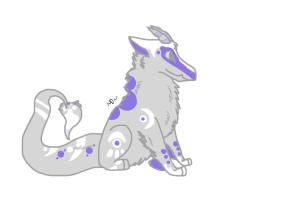
Hello!
book rec;; Good Omens by Terry Pratchett & Neil Gaiman
book rec;; Good Omens by Terry Pratchett & Neil Gaiman

A girl with a passion for chickens and some really great friends <3
{kestrel.} {Pecan} {husky.}
{jbds and other characters}
{art shop} {an interesting adopt}
currently;;
only really on flightrising, ivara there as well

{kestrel.} {Pecan} {husky.}
{jbds and other characters}
{art shop} {an interesting adopt}
currently;;
only really on flightrising, ivara there as well
-
Ivara - Posts: 5276
- Joined: Mon Jan 24, 2011 8:40 am
- My pets
- My items
- My wishlist
- My gallery
- My scenes
- My dressups
- Trade with me
Re: PSW
by neonireland » Wed Jul 20, 2011 5:05 am
Haha, accepted. I have no idea how to make em small so youll get nothing of the sort. I am proud to work for you, Ivara.
- neonireland
- Posts: 5401
- Joined: Sun Feb 21, 2010 6:47 am
- My pets
- My items
- My wishlist
- My gallery
- My scenes
- My dressups
- Trade with me
Re: PSW
by Ivara » Wed Jul 20, 2011 5:23 am
Thank you! <3
Let me show you the guild I have to do it, but I don't even need it anymore, its really simple! Here it is:
How To Make Your Picture's Background Transparent:
I know that some people like having their background transparent. This is a simple thing to do, actually. Most want their background gone because it only includes what was colored in the picture. This is also a good thing to do if you have an adoptable thread or if you like posting adapted Oekaki images in your signature.
NOTE: There's no point in going through these steps if you will not post your colored picture elsewhere.
There is only one way to go about doing this. Listen carefully and make sure you do EVERY step or it won't work!
Step 1:
Remove the background on your picture before saving it.
Step 2:
Once posted, right-click on your image and go down on the options to "Image Properties," "Properties," or "View Image Info." This is located near the bottom of the options that appear.
Step 3:
Once you are in the Properties[An extra window will pop up], right-click on the link that is highlighted automatically and click "Copy."
Step 4:
When you get the link, paste it in the IMG code bars()
Step 5:
This part can be tricky. When you get your code together, look near the end of the URL you just pasted. It should have "format=auto". Change "auto" to "png."
---EXAMPLE---
Code: Select all

What is PNG?
PNG is just a type of image that reserves background transparency.
That's all you need to know about coloring this editable!
I don't usually pay attention to the png. because it won't do anything, the background is already white. And to turn this:
to this:

Just find where it says large&format and change it to small&format, then it becomes small. But an around the code and you have the picture! To make a select all box just add this: [code][/code]
Let me show you the guild I have to do it, but I don't even need it anymore, its really simple! Here it is:
How To Make Your Picture's Background Transparent:
I know that some people like having their background transparent. This is a simple thing to do, actually. Most want their background gone because it only includes what was colored in the picture. This is also a good thing to do if you have an adoptable thread or if you like posting adapted Oekaki images in your signature.
NOTE: There's no point in going through these steps if you will not post your colored picture elsewhere.
There is only one way to go about doing this. Listen carefully and make sure you do EVERY step or it won't work!
Step 1:
Remove the background on your picture before saving it.
Step 2:
Once posted, right-click on your image and go down on the options to "Image Properties," "Properties," or "View Image Info." This is located near the bottom of the options that appear.
Step 3:
Once you are in the Properties[An extra window will pop up], right-click on the link that is highlighted automatically and click "Copy."
Step 4:
When you get the link, paste it in the IMG code bars()
Step 5:
This part can be tricky. When you get your code together, look near the end of the URL you just pasted. It should have "format=auto". Change "auto" to "png."
---EXAMPLE---
Code: Select all

What is PNG?
PNG is just a type of image that reserves background transparency.
That's all you need to know about coloring this editable!
I don't usually pay attention to the png. because it won't do anything, the background is already white. And to turn this:
to this:

Just find where it says large&format and change it to small&format, then it becomes small. But an around the code and you have the picture! To make a select all box just add this: [code][/code]
Hello!
book rec;; Good Omens by Terry Pratchett & Neil Gaiman
book rec;; Good Omens by Terry Pratchett & Neil Gaiman
A girl with a passion for chickens and some really great friends <3
{kestrel.} {Pecan} {husky.}
{jbds and other characters}
{art shop} {an interesting adopt}
currently;;
only really on flightrising, ivara there as well
{kestrel.} {Pecan} {husky.}
{jbds and other characters}
{art shop} {an interesting adopt}
currently;;
only really on flightrising, ivara there as well
-
Ivara - Posts: 5276
- Joined: Mon Jan 24, 2011 8:40 am
- My pets
- My items
- My wishlist
- My gallery
- My scenes
- My dressups
- Trade with me
Re: PSW
by neonireland » Wed Jul 20, 2011 5:28 am
Hmm, that just got really confusing. Sorry, I just cant do it.
- neonireland
- Posts: 5401
- Joined: Sun Feb 21, 2010 6:47 am
- My pets
- My items
- My wishlist
- My gallery
- My scenes
- My dressups
- Trade with me
Re: PSW
by Ivara » Wed Jul 20, 2011 5:35 am
once you post it, go back and view your PSW, right-click its picture and find either "Image Properties," "Properties," or "View Image Info." Mine is always image info. A window will pop up once you click this and a link will be highlighted, copy this link and then go make a post. Paste the link, change large&format to small&format, add around the link and you have your picture! Then copy the link to the picture with the around it, and post it under the first picture, then add
[img]Idon'tknowwhattoputheresmall&format=autosomething[/img]
You'll end up with a picture and a code to put in your signature
- Code: Select all
[img]Idon'tknowwhattoputheresmall&format=autosomething[/img]
- Code: Select all
[img]Idon'tknowwhattoputheresmall&format=autosomething[/img]
You'll end up with a picture and a code to put in your signature
Hello!
book rec;; Good Omens by Terry Pratchett & Neil Gaiman
book rec;; Good Omens by Terry Pratchett & Neil Gaiman
A girl with a passion for chickens and some really great friends <3
{kestrel.} {Pecan} {husky.}
{jbds and other characters}
{art shop} {an interesting adopt}
currently;;
only really on flightrising, ivara there as well
{kestrel.} {Pecan} {husky.}
{jbds and other characters}
{art shop} {an interesting adopt}
currently;;
only really on flightrising, ivara there as well
-
Ivara - Posts: 5276
- Joined: Mon Jan 24, 2011 8:40 am
- My pets
- My items
- My wishlist
- My gallery
- My scenes
- My dressups
- Trade with me
- neonireland
- Posts: 5401
- Joined: Sun Feb 21, 2010 6:47 am
- My pets
- My items
- My wishlist
- My gallery
- My scenes
- My dressups
- Trade with me
Re: PSW
by Swishy & Broken » Wed Jul 20, 2011 8:40 am
you are supposed to
1. right click the picture.
2. a popup will come, go to the bottom and click properties
3. there shoul be a http/ ( whatever the bar code address is )
4. copy it
5. put on full editare ( like wen you post )
6. at the top of the box were you type stuff in there is a box that says image, click that and paste the code you copied
7. to make the code just click code ,that, again, is above the box were the words go
8. YOU ARE DONE!!!
if you want it small apart of the code says ` size=large` earse large and put small
1. right click the picture.
2. a popup will come, go to the bottom and click properties
3. there shoul be a http/ ( whatever the bar code address is )
4. copy it
5. put on full editare ( like wen you post )
6. at the top of the box were you type stuff in there is a box that says image, click that and paste the code you copied
7. to make the code just click code ,that, again, is above the box were the words go
8. YOU ARE DONE!!!
if you want it small apart of the code says ` size=large` earse large and put small
Last edited by Swishy & Broken on Thu Jul 21, 2011 4:44 am, edited 2 times in total.





-

Swishy & Broken - General Helper
- Posts: 34309
- Joined: Sun May 09, 2010 2:00 pm
- My pets
- My items
- My wishlist
- My gallery
- My scenes
- My dressups
- Trade with me
- neonireland
- Posts: 5401
- Joined: Sun Feb 21, 2010 6:47 am
- My pets
- My items
- My wishlist
- My gallery
- My scenes
- My dressups
- Trade with me
Re: PSW
by Ivara » Thu Jul 21, 2011 5:35 am
Get open a post, right by the u sign, look two to the right and a box says Code, highlight what you want to code and a box will appear around it when you post.
Hello!
book rec;; Good Omens by Terry Pratchett & Neil Gaiman
book rec;; Good Omens by Terry Pratchett & Neil Gaiman
A girl with a passion for chickens and some really great friends <3
{kestrel.} {Pecan} {husky.}
{jbds and other characters}
{art shop} {an interesting adopt}
currently;;
only really on flightrising, ivara there as well
{kestrel.} {Pecan} {husky.}
{jbds and other characters}
{art shop} {an interesting adopt}
currently;;
only really on flightrising, ivara there as well
-
Ivara - Posts: 5276
- Joined: Mon Jan 24, 2011 8:40 am
- My pets
- My items
- My wishlist
- My gallery
- My scenes
- My dressups
- Trade with me
11 posts
• Page 1 of 2 • 1, 2
Who is online
Users browsing this forum: No registered users and 3 guests