
Forum rules
Oekaki posts must follow our Rules for the Site and Forum,
including the Oekaki Rules and Art Rules.
Having trouble using oekaki? Check out the Oekaki Guide or send in a help ticket.
Oekaki posts must follow our Rules for the Site and Forum,
including the Oekaki Rules and Art Rules.
Having trouble using oekaki? Check out the Oekaki Guide or send in a help ticket.
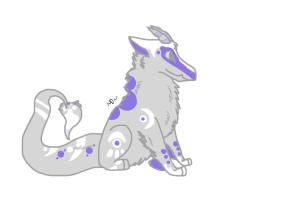
Art for jbd #436 Name by Adallina

| Artist | Adallina [gallery] |
| Time spent | 1 hour, 2 minutes |
| Drawing sessions | 2 |
| 5 people like this | Log in to vote for this drawing |

6 posts
• Page 1 of 1
Art for jbd #436 Name
 by Adallina » Tue Apr 23, 2013 9:15 am
My second art piece for jbd 436. i wanted to do his name in a cool way and then this came out...somehow... If I got him I would name him Ghoul, in case anyone can't read my wierd cursive.
Does anyone know how to make this transparent???
Jbd(C) Hiccup
Design (C) Blitz (who is atm "Silver Bullets")
art (C) me
Does anyone know how to make this transparent???
Jbd(C) Hiccup
Design (C) Blitz (who is atm "Silver Bullets")
art (C) me
Hey, I'm Lina c: I love fictional writing and reading as well as art of course!
Be yourself.
Everyone else is already taken. ~Oscar Wilde


-
Adallina - Posts: 1889
- Joined: Thu Dec 08, 2011 6:15 am
- My pets
- My items
- My wishlist
- My gallery
- My scenes
- My dressups
- Trade with me
Re: Art for jbd #436 Name
by Ivara » Tue Apr 23, 2013 2:46 pm
Transparent? First you'll want to take the off the background layer in the drawing
After that's done, right click on the drawing and select view image info, a window will open and your going to copy and paste the highlighted code, for this drawing, the code will look like this
Now, to make the code transparent, we find where it says auto
large&format=auto&rev
and change that to png so the code will now look like this;
large&format=png&rev
If the background layer isn't on, the drawing will now have a transparent background!
c:
After that's done, right click on the drawing and select view image info, a window will open and your going to copy and paste the highlighted code, for this drawing, the code will look like this
- Code: Select all
http://www.chickensmoothie.com/oekaki/image/image.php?id=1488378&size=large&format=auto&rev=1366674154
Now, to make the code transparent, we find where it says auto
large&format=auto&rev
and change that to png so the code will now look like this;
large&format=png&rev
- Code: Select all
http://www.chickensmoothie.com/oekaki/image/image.php?id=1488378&size=large&format=png&rev=1366674154
If the background layer isn't on, the drawing will now have a transparent background!
c:
Hello!
book rec;; Good Omens by Terry Pratchett & Neil Gaiman
book rec;; Good Omens by Terry Pratchett & Neil Gaiman

A girl with a passion for chickens and some really great friends <3
{kestrel.} {Pecan} {husky.}
{jbds and other characters}
{art shop} {an interesting adopt}
currently;;
only really on flightrising, ivara there as well

{kestrel.} {Pecan} {husky.}
{jbds and other characters}
{art shop} {an interesting adopt}
currently;;
only really on flightrising, ivara there as well
-
Ivara - Posts: 5276
- Joined: Mon Jan 24, 2011 8:40 am
- My pets
- My items
- My wishlist
- My gallery
- My scenes
- My dressups
- Trade with me
Re: Art for jbd #436 Name
by Adallina » Wed Apr 24, 2013 8:09 am
You. Are. Amazing. Thanks so much!
Hey, I'm Lina c: I love fictional writing and reading as well as art of course!
Be yourself.
Everyone else is already taken. ~Oscar Wilde
-
Adallina - Posts: 1889
- Joined: Thu Dec 08, 2011 6:15 am
- My pets
- My items
- My wishlist
- My gallery
- My scenes
- My dressups
- Trade with me
Re: Art for jbd #436 Name
by winter.sunset » Wed Apr 24, 2013 8:25 am
-.- You could have asked me that,I would've told you.
Anyway,THIS IS FRIGGIN AWESOME!!Your chances just increased by 20%!!Good luck!!
Anyway,THIS IS FRIGGIN AWESOME!!Your chances just increased by 20%!!Good luck!!






-
winter.sunset - Posts: 6246
- Joined: Sun Jan 06, 2013 10:03 am
- My pets
- My items
- My wishlist
- My gallery
- My scenes
- My dressups
- Trade with me
Re: Art for jbd #436 Name
by Adallina » Wed Apr 24, 2013 8:40 am
thanks cuz!
Hey, I'm Lina c: I love fictional writing and reading as well as art of course!
Be yourself.
Everyone else is already taken. ~Oscar Wilde
-
Adallina - Posts: 1889
- Joined: Thu Dec 08, 2011 6:15 am
- My pets
- My items
- My wishlist
- My gallery
- My scenes
- My dressups
- Trade with me
Re: Art for jbd #436 Name
by Ivara » Wed Apr 24, 2013 9:33 am
^u^ Just glad I could help~
Hello!
book rec;; Good Omens by Terry Pratchett & Neil Gaiman
book rec;; Good Omens by Terry Pratchett & Neil Gaiman
A girl with a passion for chickens and some really great friends <3
{kestrel.} {Pecan} {husky.}
{jbds and other characters}
{art shop} {an interesting adopt}
currently;;
only really on flightrising, ivara there as well
{kestrel.} {Pecan} {husky.}
{jbds and other characters}
{art shop} {an interesting adopt}
currently;;
only really on flightrising, ivara there as well
-
Ivara - Posts: 5276
- Joined: Mon Jan 24, 2011 8:40 am
- My pets
- My items
- My wishlist
- My gallery
- My scenes
- My dressups
- Trade with me
6 posts
• Page 1 of 1
Who is online
Users browsing this forum: plateOfFlan and 3 guests