
Forum rules
Oekaki posts must follow our Rules for the Site and Forum,
including the Oekaki Rules and Art Rules.
Having trouble using oekaki? Check out the Oekaki Guide or send in a help ticket.
Oekaki posts must follow our Rules for the Site and Forum,
including the Oekaki Rules and Art Rules.
Having trouble using oekaki? Check out the Oekaki Guide or send in a help ticket.
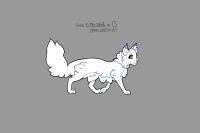
Cat lines mini editable by LavenderRain

| Based on | Click to view |
| Artist | LavenderRain [gallery] |
| Time spent | 9 minutes |
| Drawing sessions | 1 |
| 23 people like this | Log in to vote for this drawing |
Versions of this drawing that people have created recently



10 posts
• Page 1 of 1
Cat lines mini editable
 by LavenderRain » Wed Mar 03, 2021 10:19 am
Lines belong to minecraft wolf here! I simply shrunk and multiplied them to make adoptables :>
Please make sure to follow their guidelines they made for the lines! ^^
✿ don't remove my signature (or tikki's signature, if you use their background (background has been removed in this version))
✿ if you use off-site, have a link back to this page (or to my dA account if you post there!)
✿ feel free to edit the lines as much as you like!!
Please make sure to follow their guidelines they made for the lines! ^^
✿ don't remove my signature (or tikki's signature, if you use their background (background has been removed in this version))
✿ if you use off-site, have a link back to this page (or to my dA account if you post there!)
✿ feel free to edit the lines as much as you like!!
Adult ▪ Female ▪ Married ▪  ▪ Christian ▪ Sept. 14th ▪ Artist
Toyhouse ▪ DeviantArt ▪ DA Adopts ▪ CS Adopts
Completed my entire wishlist on 2/5/2024! :D
▪ Christian ▪ Sept. 14th ▪ Artist Toyhouse ▪ DeviantArt ▪ DA Adopts ▪ CS Adopts
Completed my entire wishlist on 2/5/2024! :D
-

LavenderRain - Posts: 4902
- Joined: Tue Nov 01, 2016 6:30 am
- My pets
- My items
- My wishlist
- My gallery
- My scenes
- My dressups
- Trade with me
Re: Cat lines mini editable
by Froot_Loop_Waffle » Wed Mar 03, 2021 11:32 am
On oekaki, how do you multiply, shrink and do other stuff?
x
..................

x

was previously Galloper Ranch & ♥ Blossom ♥ 🌿 she/her, 21 |
toyhou.se/GalloperRanch | POTSie - Arthritic - Scoliosis and more 🌵| ©
toyhou.se/GalloperRanch | POTSie - Arthritic - Scoliosis and more 🌵| ©
-

Froot_Loop_Waffle - Posts: 1372
- Joined: Sun Jun 23, 2019 2:36 pm
- My pets
- My items
- My wishlist
- My gallery
- My scenes
- My dressups
- Trade with me
Re: Cat lines mini editable
by LavenderRain » Wed Mar 03, 2021 12:57 pm
Galloper Ranch wrote:On oekaki, how do you multiply, shrink and do other stuff?
Shrinking, Enlarging, 360 Rotating -- When you're in Oekaki, on the top setting under edit, there is an option called transform. This option will let you change the size of the current selected layer or folder. You can also shift the angle of the layer as well, just note that the lines become a bit blurry! You can also hot key it with ctrl+y
Multiply -- On the top setting under layers, there is an option called duplicate. This option will completely duplicate the layer or folder you have selected. you can also hot key it with shift+ctrl+d
Hope this helps! ^^
Adult ▪ Female ▪ Married ▪ ▪ Christian ▪ Sept. 14th ▪ Artist
Toyhouse ▪ DeviantArt ▪ DA Adopts ▪ CS Adopts
Completed my entire wishlist on 2/5/2024! :D
▪ Christian ▪ Sept. 14th ▪ Artist Toyhouse ▪ DeviantArt ▪ DA Adopts ▪ CS Adopts
Completed my entire wishlist on 2/5/2024! :D
-
LavenderRain - Posts: 4902
- Joined: Tue Nov 01, 2016 6:30 am
- My pets
- My items
- My wishlist
- My gallery
- My scenes
- My dressups
- Trade with me
Re: Cat lines mini editable
by Froot_Loop_Waffle » Wed Mar 03, 2021 4:45 pm
LavenderRain wrote:Galloper Ranch wrote:On oekaki, how do you multiply, shrink and do other stuff?
Shrinking, Enlarging, 360 Rotating -- When you're in Oekaki, on the top setting under edit, there is an option called transform. This option will let you change the size of the current selected layer or folder. You can also shift the angle of the layer as well, just note that the lines become a bit blurry! You can also hot key it with ctrl+y
Multiply -- On the top setting under layers, there is an option called duplicate. This option will completely duplicate the layer or folder you have selected. you can also hot key it with shift+ctrl+d
Hope this helps! ^^
Yay thank you!!
x
..................
x
was previously Galloper Ranch & ♥ Blossom ♥ 🌿 she/her, 21 |
toyhou.se/GalloperRanch | POTSie - Arthritic - Scoliosis and more 🌵| ©
toyhou.se/GalloperRanch | POTSie - Arthritic - Scoliosis and more 🌵| ©
-
Froot_Loop_Waffle - Posts: 1372
- Joined: Sun Jun 23, 2019 2:36 pm
- My pets
- My items
- My wishlist
- My gallery
- My scenes
- My dressups
- Trade with me
-

Spiritstar3 - Posts: 150693
- Joined: Thu Apr 19, 2012 11:56 am
- My pets
- My items
- My wishlist
- My gallery
- My scenes
- My dressups
- Trade with me





.jpg)




-

rainboot - Posts: 2250
- Joined: Sun Mar 22, 2020 10:01 pm
- My pets
- My items
- My wishlist
- My gallery
- My scenes
- My dressups
- Trade with me


-

TheBrokenRobot - Posts: 2360
- Joined: Fri Mar 01, 2019 8:55 am
- My pets
- My items
- My wishlist
- My gallery
- My scenes
- My dressups
- Trade with me
Re: Cat lines mini editable
by Sheeep » Thu Jan 25, 2024 12:05 pm
Mark ^-^
The names Sheeep but you can call me Baa ╳ She/Her ╳ I like Foxes, Wolves, horses and Small mammals

-

Sheeep - Posts: 17
- Joined: Wed Jan 24, 2024 12:26 am
- My pets
- My items
- My wishlist
- My gallery
- My scenes
- My dressups
- Trade with me
Re: Cat lines mini editable
by Strange_Atoms » Sat Jul 20, 2024 12:58 pm
Mark


ALL GOOD THINGS FLOW INTO THE CITY
-

Strange_Atoms - Posts: 5699
- Joined: Tue Sep 08, 2015 10:51 am
- My pets
- My items
- My wishlist
- My gallery
- My scenes
- My dressups
- Trade with me
Re: Cat lines mini editable
by LittleBodyBigHeart » Sat Aug 17, 2024 2:22 pm
mark
"make an oath, then make mistakes;
start a streak you're bound to break.
when darkness rolls on you,
push on through."
start a streak you're bound to break.
when darkness rolls on you,
push on through."
-

LittleBodyBigHeart - Posts: 8641
- Joined: Sun Sep 08, 2013 12:26 am
- My pets
- My items
- My wishlist
- My gallery
- My scenes
- My dressups
- Trade with me
10 posts
• Page 1 of 1
Who is online
Users browsing this forum: Google Adsense [Bot] and 4 guests