
Forum rules
Oekaki posts must follow our Rules for the Site and Forum,
including the Oekaki Rules and Art Rules.
Having trouble using oekaki? Check out the Oekaki Guide or send in a help ticket.
Oekaki posts must follow our Rules for the Site and Forum,
including the Oekaki Rules and Art Rules.
Having trouble using oekaki? Check out the Oekaki Guide or send in a help ticket.

Re: "How To Use Oekaki?" Guide
 by amithea » Sat Jul 11, 2015 4:26 am
Svel wrote:amberwonder wrote:Just a quick question...
Is it possible to resize stuff? If so, how do you do it?
Okay, so that's technically two questions, but............
Yes, it is possible to resize images. You can either resize it through an image editing program (Such as Photoshop), or changing the URL (If drawn on the Oekaki)
If the drawing you want to resize was drawn on the Oekaki, you can resize it this way:
(I'm going to be using an Oekaki image from the front page of this topic as an example, original Oekaki drawing located here, drawn by Rainwolfeh.)
If you left click on the drawing you want to take the URL of, you'll see something like this (Depending on which browser you're using, this may look different. I'm using Firefox.)
By clicking on "copy image location" (Or copy image URL/copy image address), you'll have copied the image URL.
This is the image URL I copied:
- Code: Select all
http://www.chickensmoothie.com/oekaki/image/image.php?id=634818&size=large&format=auto&rev=1316482505
If you look at the image URL, it has the words "size=large" near the end of it. You can replace the word "large" after size with either "medium" or "small" to change the image size. For example:
Image URL of the above (Medium):
- Code: Select all
http://www.chickensmoothie.com/oekaki/image/image.php?id=634818&size=medium&format=auto&rev=1316482505
Image URL of the above (Small):
- Code: Select all
http://www.chickensmoothie.com/oekaki/image/image.php?id=634818&size=small&format=auto&rev=1316482505


cool, thanks!
-

amithea - Posts: 1530
- Joined: Tue Mar 17, 2015 7:21 am
- My pets
- My items
- My wishlist
- My gallery
- My scenes
- My dressups
- Trade with me
Re: "How To Use Oekaki?" Guide
by qilky » Sat Jul 11, 2015 9:10 am
Nevermind, I figured it out :)
Last edited by qilky on Sat Jul 11, 2015 1:12 pm, edited 4 times in total.
used to be known as space/spacewolf + doojay/jay + avery + almond + mayika
hey fellas im not active here anymore but id like to keep the acc up as an archive, thanx!
if u want to find me im active on my insta @qilky
thanks for being such an important part of my childhood, cs
hey fellas im not active here anymore but id like to keep the acc up as an archive, thanx!
if u want to find me im active on my insta @qilky
thanks for being such an important part of my childhood, cs
-
qilky - Posts: 6218
- Joined: Thu Dec 12, 2013 10:51 am
- My pets
- My items
- My wishlist
- My gallery
- My scenes
- My dressups
- Trade with me
Re: "How To Use Oekaki?" Guide
by Waki » Sat Jul 11, 2015 10:41 am
Alright one question, how do you move oekaki drawings to different boards? Such as if I had a drawing in 'sketches and experiments' and I want to move it to intermediate l, how would I do that? Contact a staff? Or do it myself? O.o
I draw and make things :3


-

Waki - Posts: 5505
- Joined: Tue Feb 11, 2014 11:33 am
- My pets
- My items
- My wishlist
- My gallery
- My scenes
- My dressups
- Trade with me
Re: "How To Use Oekaki?" Guide
by pitbullovers4ever » Tue Jul 14, 2015 10:24 am
I;m new and wanted to try out Oekai. It said I needed to install Java Plug in. I installed it onto my mac and it still didn't work. What do I do?
- pitbullovers4ever
- Posts: 22
- Joined: Sun Apr 26, 2015 5:36 am
- My pets
- My items
- My wishlist
- My gallery
- My scenes
- My dressups
- Trade with me
Re: "How To Use Oekaki?" Guide
by Svel » Tue Jul 14, 2015 2:19 pm
Waki wrote:Alright one question, how do you move oekaki drawings to different boards? Such as if I had a drawing in 'sketches and experiments' and I want to move it to intermediate l, how would I do that? Contact a staff? Or do it myself? O.o
You can report the first post of the thread by clicking on the triangle on the upper right of the post, and state that you'd like the thread moved using the further information field. You won't be able to move threads yourself.
XxMoonSparklexX wrote:I;m new and wanted to try out Oekai. It said I needed to install Java Plug in. I installed it onto my mac and it still didn't work. What do I do?
I'm not sure what happens when you say "it didn't work", but here's a link to the Oekaki/Java problems and solutions thread, you might find your issue and your solution there. :3

An Irish Blessing wrote:Always remember to forget
The troubles that passed away.
But never forget to remember
The blessings that come each day.
Unknown wrote:Kindness is free; pass it on
On semi-hiatus wrote:It's been an awesome few years, CS. You've been a pivotal part of my childhood. I pop by every once in a blue moon to reminisce, and find myself smiling at familiar faces in the boards and the cool collectibles each time.
Avatar by Jenny Downing on Flickr
I love you, Laura, and I miss you dearly.
-
Svel - Posts: 2544
- Joined: Mon Feb 20, 2012 3:01 am
- My pets
- My items
- My wishlist
- My gallery
- My scenes
- My dressups
- Trade with me
Re: "How To Use Oekaki?" Guide
by mal du pays » Thu Jul 16, 2015 8:48 am
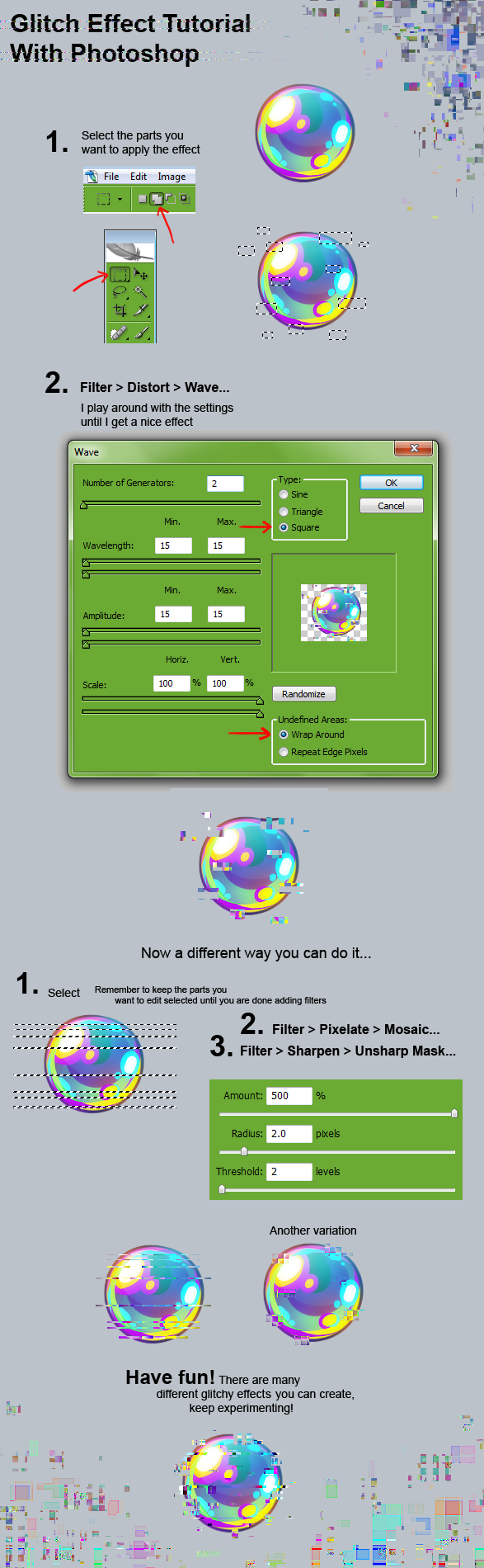
I was wondering- is there a possible way to do a "glitch" effect with the oekaki?

xxxxxxxxxxxxxxxx
Will you be here when I get back?
xxxxxxxxxxxxxxxx
Michael (Mal)/Riv - It/they/he - adult
play in stars and time
I like Deltarune, drawing, warrior cats, and sonic the hedgehog.
majoring in frinology
⬩ Deer ⬩ Kiri ⬩
Magistream - strawpage
Kalons - Storkies - Wermz Co-op - Genesis storage - Keepsies Co-op
My OCs - My Kalons - Storkies Archive - Stars Archive
xxxxxxxxxxxxxxxx
Cool! Okay, Bye bye
xxxxxxxxxxxxxxxx
-

mal du pays - Posts: 42338
- Joined: Sun Mar 27, 2011 8:33 am
- My pets
- My items
- My wishlist
- My gallery
- My scenes
- My dressups
- Trade with me
Re: "How To Use Oekaki?" Guide
by Svel » Fri Jul 17, 2015 8:12 pm
Takura {TNK} wrote:I was wondering- is there a possible way to do a "glitch" effect with the oekaki?
What do you mean by "glitch" effect? Something like this perhaps?:

An Irish Blessing wrote:Always remember to forget
The troubles that passed away.
But never forget to remember
The blessings that come each day.
Unknown wrote:Kindness is free; pass it on
On semi-hiatus wrote:It's been an awesome few years, CS. You've been a pivotal part of my childhood. I pop by every once in a blue moon to reminisce, and find myself smiling at familiar faces in the boards and the cool collectibles each time.
Avatar by Jenny Downing on Flickr
I love you, Laura, and I miss you dearly.
-
Svel - Posts: 2544
- Joined: Mon Feb 20, 2012 3:01 am
- My pets
- My items
- My wishlist
- My gallery
- My scenes
- My dressups
- Trade with me
Re: "How To Use Oekaki?" Guide
by mal du pays » Fri Jul 17, 2015 8:16 pm
Svel wrote:Takura {TNK} wrote:I was wondering- is there a possible way to do a "glitch" effect with the oekaki?
What do you mean by "glitch" effect? Something like this perhaps?:
i actually mean something similar to this;
image is by kawiku on dA
something sort of like that kind of glitch effect. uvu
xxxxxxxxxxxxxxxx
Will you be here when I get back?
xxxxxxxxxxxxxxxx
Michael (Mal)/Riv - It/they/he - adult
play in stars and time
I like Deltarune, drawing, warrior cats, and sonic the hedgehog.
majoring in frinology
⬩ Deer ⬩ Kiri ⬩
Magistream - strawpage
Kalons - Storkies - Wermz Co-op - Genesis storage - Keepsies Co-op
My OCs - My Kalons - Storkies Archive - Stars Archive
xxxxxxxxxxxxxxxx
Cool! Okay, Bye bye
xxxxxxxxxxxxxxxx
-
mal du pays - Posts: 42338
- Joined: Sun Mar 27, 2011 8:33 am
- My pets
- My items
- My wishlist
- My gallery
- My scenes
- My dressups
- Trade with me
how do i delete a drawing?
by rolyo » Sat Jul 18, 2015 4:58 am
- i have four trash pictures in my gallery i did a while ago with a mouse. i really don't like how they clutter things up and would like to delete them. however, all four have been commented on, so i can't find a way to delete the image. do i have to ask an Oekaki moderator?
bump it and make the title "mods please delete"?
or is there another way? i checked all the sections that might apply to my question, even searching "delete" with ctrl+f, but i got nothing.
if possible a response by pm would be best, seeing as i often lose my question in popular threads. ^~^'
thanks in advance!!
-

rolyo - Posts: 2597
- Joined: Fri Sep 06, 2013 2:50 am
- My pets
- My items
- My wishlist
- My gallery
- My scenes
- My dressups
- Trade with me
Re: "How To Use Oekaki?" Guide
by Purrfectpal » Sat Jul 18, 2015 12:25 pm
Okay so this helped me SO much. When I am able to I will try all these tips. I might take the snapshots I did of the stuff I didn't know and copy them into Text Edit and place it beside my tab when I am doing Oekaki. EEP I AM SO EXCITED I FEEL LIKE A 5 YEAR OLD! I ALSO GOT LINE ART TIPS SQUEE!

Art by MintleFlower
♥ ♡ ♥
|| Purrfectpal || She/Her || Adult ||
╔══════════════════╗
Hi, I'm Purrfectpal. I am always open to chat with
new people so feel free to send over a message. <3
╚══════════════════╝
|| carrd | commissions | art shoppe ||
♥ ♡ ♥
|| Purrfectpal || She/Her || Adult ||
╔══════════════════╗
Hi, I'm Purrfectpal. I am always open to chat with
new people so feel free to send over a message. <3
╚══════════════════╝
|| carrd | commissions | art shoppe ||
♥ ♡ ♥

-

Purrfectpal - Posts: 5610
- Joined: Fri Jan 09, 2015 3:50 am
- My pets
- My items
- My wishlist
- My gallery
- My scenes
- My dressups
- Trade with me
Who is online
Users browsing this forum: No registered users and 3 guests