
Forum rules
Oekaki posts must follow our Rules for the Site and Forum,
including the Oekaki Rules and Art Rules.
Having trouble using oekaki? Check out the Oekaki Guide or send in a help ticket.
Oekaki posts must follow our Rules for the Site and Forum,
including the Oekaki Rules and Art Rules.
Having trouble using oekaki? Check out the Oekaki Guide or send in a help ticket.

Re: "How To Use Oekaki?" Guide
 by Dylan Klebold » Sat Apr 25, 2015 9:16 am
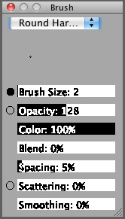
junebug. wrote:I've been looking at the lines for editables and thought: How do I get my lines to be smooth and end like that? Like this one, if you know what I'm talking about even..
Smoothing! It's the last option in this window.
- Dylan Klebold
- Posts: 19858
- Joined: Mon Apr 04, 2011 12:18 am
- My pets
- My items
- My wishlist
- My gallery
- My scenes
- My dressups
- Trade with me
Re: "How To Use Oekaki?" Guide
by solflo » Sat Apr 25, 2015 9:20 am
Tadashi Hamada wrote:junebug. wrote:I've been looking at the lines for editables and thought: How do I get my lines to be smooth and end like that? Like this one, if you know what I'm talking about even..
Smoothing! It's the last option in this window.
Yes. For mouse, the best is around 75%. For touchscreen notebooks, 45-50%. I can't talk about pen pressure though. It also helps sketching first and then lining. You can see the difference

 formerly
 -

solflo - Posts: 2898
- Joined: Sun Jul 28, 2013 6:09 am
- My pets
- My items
- My wishlist
- My gallery
- My scenes
- My dressups
- Trade with me
Re: "How To Use Oekaki?" Guide
by 57461 » Sat Apr 25, 2015 10:10 am
Do you only have to use the rotate tool to make it a vertical image or does something special have to be done other than that?
Nvm, i figured it out. But I do have another question: So, I've been seeing some artists with gradients in their art. Is there some sort of gradient button thing you can use or is that just textures?
Nvm, i figured it out. But I do have another question: So, I've been seeing some artists with gradients in their art. Is there some sort of gradient button thing you can use or is that just textures?
- 9/28/18,
i quit
Ive had a lot of fun with you guys!
Farewell!
- 57461
- Posts: 3185
- Joined: Fri Nov 06, 2009 10:58 am
- My pets
- My items
- My wishlist
- My gallery
- My scenes
- My dressups
- Trade with me
Re: "How To Use Oekaki?" Guide
by Luae; » Sun Apr 26, 2015 11:41 pm
- I know you can move a selected part of a drawing, but can you resize it?


⚱.................☠
遠 哭
FAR CRY
祕境
UNCHARTED
生化奇兵
BIOSHOCK
巫師
THE WITCHER
ϟ ................. ⚔
遠 哭
FAR CRY
祕境
UNCHARTED
生化奇兵
BIOSHOCK
巫師
THE WITCHER
ϟ ................. ⚔
-

Luae; - Posts: 3041
- Joined: Mon Feb 07, 2011 4:25 am
- My pets
- My items
- My wishlist
- My gallery
- My scenes
- My dressups
- Trade with me
Re: "How To Use Oekaki?" Guide
by solflo » Mon Apr 27, 2015 7:57 am
tomato cat wrote:Do you only have to use the rotate tool to make it a vertical image or does something special have to be done other than that?
Nvm, i figured it out. But I do have another question: So, I've been seeing some artists with gradients in their art. Is there some sort of gradient button thing you can use or is that just textures?
Nope. But there's lock alpha to do it
Luae; wrote:
I know you can move a selected part of a drawing, but can you resize it?
Nope (but that'd be awesome)
-
solflo - Posts: 2898
- Joined: Sun Jul 28, 2013 6:09 am
- My pets
- My items
- My wishlist
- My gallery
- My scenes
- My dressups
- Trade with me
Re: "How To Use Oekaki?" Guide
by discontinued. » Wed Apr 29, 2015 5:36 am
Hello, I need some help with my oekaki program.
So whenever I try to draw with the oekaki program it just shows a blank grey screen. Any suggestions?
So whenever I try to draw with the oekaki program it just shows a blank grey screen. Any suggestions?
-

discontinued. - Posts: 5428
- Joined: Sun Nov 10, 2013 12:45 pm
- My pets
- My items
- My wishlist
- My gallery
- My scenes
- My dressups
- Trade with me
Re: "How To Use Oekaki?" Guide
by Ava Ire » Mon May 04, 2015 2:14 am
Fake A Smile wrote:Hello, I need some help with my oekaki program.
So whenever I try to draw with the oekaki program it just shows a blank grey screen. Any suggestions?
I have the same problem.. just that there's a puzzle piece in the middle. I already updated java..
-

Ava Ire - Posts: 1003
- Joined: Thu Oct 28, 2010 10:12 am
- My pets
- My items
- My wishlist
- My gallery
- My scenes
- My dressups
- Trade with me
Re: "How To Use Oekaki?" Guide
by 57461 » Mon May 04, 2015 3:42 am
Ava Ire wrote:Fake A Smile wrote:Hello, I need some help with my oekaki program.
So whenever I try to draw with the oekaki program it just shows a blank grey screen. Any suggestions?
I have the same problem.. just that there's a puzzle piece in the middle. I already updated java..
Have you guys tried updating your Oekaki?
http://www.chickensmoothie.com/oekaki/settings.php
- 9/28/18,
i quit
Ive had a lot of fun with you guys!
Farewell!
- 57461
- Posts: 3185
- Joined: Fri Nov 06, 2009 10:58 am
- My pets
- My items
- My wishlist
- My gallery
- My scenes
- My dressups
- Trade with me
Re: "How To Use Oekaki?" Guide
by im-another-banana » Mon May 04, 2015 5:12 am
how do you get oekaki? do you have to download anything?
.png)
.jpg)






.png)





.png)


.png)
.png)
.png)
.png)
.png)

-

im-another-banana - Posts: 141
- Joined: Sat Jan 17, 2015 2:31 am
- My pets
- My items
- My wishlist
- My gallery
- My scenes
- My dressups
- Trade with me
Re: "How To Use Oekaki?" Guide
by solflo » Mon May 04, 2015 5:37 am
im-another-banana wrote:how do you get oekaki? do you have to download anything?
Only Java :3
----
Side note: guys, I found a way to save one layer drawings! If you have drawn on your bg, just set it to multiply and color on a layer below. It works just fine cx
-
solflo - Posts: 2898
- Joined: Sun Jul 28, 2013 6:09 am
- My pets
- My items
- My wishlist
- My gallery
- My scenes
- My dressups
- Trade with me
Who is online
Users browsing this forum: No registered users and 2 guests