
Forum rules
Oekaki posts must follow our Rules for the Site and Forum,
including the Oekaki Rules and Art Rules.
Having trouble using oekaki? Check out the Oekaki Guide or send in a help ticket.
Oekaki posts must follow our Rules for the Site and Forum,
including the Oekaki Rules and Art Rules.
Having trouble using oekaki? Check out the Oekaki Guide or send in a help ticket.
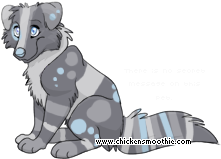
Spectrum's Eye by ramalama bang bang
-
-
 Forum avatar size

| Based on | Click to view |
| Artist | ramalama bang bang [gallery] |
| Time spent | 9 minutes |
| Drawing sessions | 1 |
| Log in to vote for this drawing | |
Forum avatar
Sorry, this artist does not allow people to use this drawing as their avatar.
8 posts
• Page 1 of 1
-

ramalama bang bang - Posts: 15
- Joined: Tue Dec 03, 2013 3:58 pm
- My pets
- My items
- My wishlist
- My gallery
- My scenes
- My dressups
- Trade with me
Re: Spectrum's Eye
 by Im not here » Thu Jul 03, 2014 5:18 pm
Do you know how to use lock Alpha dear? X3 It helps and makes easy clean up work like what you see on my Avatar :3
◤xxxxxxxxxxxxxxxx◥
- under construction -
◣xxxxxxxxxxxxxxxx◢
- under construction -
◣xxxxxxxxxxxxxxxx◢
◤xxxxxxxxxxxxxxxx◥
- under construction -
◣xxxxxxxxxxxxxxxx◢
- under construction -
◣xxxxxxxxxxxxxxxx◢
-

Im not here - Posts: 3608
- Joined: Sat Jun 14, 2014 3:00 pm
- My pets
- My items
- My wishlist
- My gallery
- My scenes
- My dressups
- Trade with me
Re: Spectrum's Eye
by ramalama bang bang » Fri Jul 04, 2014 3:03 am
Erm no, thnx for help. I'll try dat.
-
ramalama bang bang - Posts: 15
- Joined: Tue Dec 03, 2013 3:58 pm
- My pets
- My items
- My wishlist
- My gallery
- My scenes
- My dressups
- Trade with me
Re: Spectrum's Eye
by ramalama bang bang » Fri Jul 04, 2014 3:28 am
Actually, I just tried that is doesnt work I'll try it again If it doesnt work I shall say thou is lyingth
-
ramalama bang bang - Posts: 15
- Joined: Tue Dec 03, 2013 3:58 pm
- My pets
- My items
- My wishlist
- My gallery
- My scenes
- My dressups
- Trade with me
Re: Spectrum's Eye
by dogish » Fri Jul 04, 2014 7:48 am
well, did you also select which layer you want colored in?

Pet's name: Rhys
✧ looking for this babe! ✧
-

dogish - Posts: 7568
- Joined: Sun Mar 11, 2012 2:32 am
- My pets
- My items
- My wishlist
- My gallery
- My scenes
- My dressups
- Trade with me
Re: Spectrum's Eye
by ramalama bang bang » Fri Jul 04, 2014 4:04 pm
Eh??????/ I'm afraid I dont get what ur saying.........
-
ramalama bang bang - Posts: 15
- Joined: Tue Dec 03, 2013 3:58 pm
- My pets
- My items
- My wishlist
- My gallery
- My scenes
- My dressups
- Trade with me
Re: Spectrum's Eye
by Atomic Samurai » Wed Jul 30, 2014 2:51 pm
I'll explain in fact I myself only figured it out recently,
Click the Lock Alpha box
There will be a list under it click the one you wish to colour
You know it'll be selected when it turns blue
Pick the colour you want to use
And colour
Click the Lock Alpha box
There will be a list under it click the one you wish to colour
You know it'll be selected when it turns blue
Pick the colour you want to use
And colour


-

Atomic Samurai - Posts: 3911
- Joined: Sun Dec 29, 2013 11:49 am
- My pets
- My items
- My wishlist
- My gallery
- My scenes
- My dressups
- Trade with me
Re: Spectrum's Eye
by Atomic Samurai » Thu Jul 31, 2014 2:34 am
Just click on the words- clicking the circle makes the part disappear .
And using my avatar as an example the coloring when properly using lock alpha is smooth and does not bleed into any unwanted parts
And using my avatar as an example the coloring when properly using lock alpha is smooth and does not bleed into any unwanted parts
-
Atomic Samurai - Posts: 3911
- Joined: Sun Dec 29, 2013 11:49 am
- My pets
- My items
- My wishlist
- My gallery
- My scenes
- My dressups
- Trade with me
8 posts
• Page 1 of 1
Who is online
Users browsing this forum: No registered users and 1 guest