
Forum rules
Oekaki posts must follow our Rules for the Site and Forum,
including the Oekaki Rules and Art Rules.
Having trouble using oekaki? Check out the Oekaki Guide or send in a help ticket.
Oekaki posts must follow our Rules for the Site and Forum,
including the Oekaki Rules and Art Rules.
Having trouble using oekaki? Check out the Oekaki Guide or send in a help ticket.
Fox by DrawingMongoose

| Artist | DrawingMongoose [gallery] |
| Time spent | 38 minutes |
| Drawing sessions | 3 |
| Log in to vote for this drawing | |
4 posts
• Page 1 of 1
Fox
 by DrawingMongoose » Tue Jan 03, 2012 9:17 pm
I was bored, then I decided to draw a fox. Turned out real good, no? It's my best Oekaki ever!
Comments and Criticism are welcome! Not too harsh, please. :3
~GC

eue Someone make it transparent. XD PM me the transparent image, 'kay?
Comments and Criticism are welcome! Not too harsh, please. :3
~GC

eue Someone make it transparent. XD PM me the transparent image, 'kay?

Namida no nai sekai nimo sono hashi wa kakari masu ka ?
Kabe ni kizamareta rakugaki wa dareka no ji ni yoku niteta
Kanashimi wo toozakeru koto de kimi wa hashi wo kakeyou to shita
Keredo ima kasa wo sutete me wo tsuburu
-

DrawingMongoose - Posts: 3075
- Joined: Mon Feb 15, 2010 4:14 pm
- My pets
- My items
- My wishlist
- My gallery
- My scenes
- My dressups
- Trade with me
Re: Fox
by incadence. » Tue Jan 03, 2012 10:05 pm
Its great, but it looks more like a cat than a fox, the snout looks kind of flat :3. The snout has to be longer. It may be easier to draw a fox sideways if that helps :3. The fur is great but it goes the wrong way ^-^. but over all this is a fantastic art piece. yOU'RE A BRILLIANT ARTIST <3 (ends cap abuse x3) i love your style :3
.
-

incadence. - Posts: 4346
- Joined: Wed May 05, 2010 3:36 pm
- My pets
- My items
- My wishlist
- My gallery
- My scenes
- My dressups
- Trade with me
Re: Fox
by DrawingMongoose » Tue Jan 03, 2012 10:11 pm
Aw, thanks! I prefer to draw animals facing the front, but I can't seem to get it right. e.o
~GC
~GC
Namida no nai sekai nimo sono hashi wa kakari masu ka ?
Kabe ni kizamareta rakugaki wa dareka no ji ni yoku niteta
Kanashimi wo toozakeru koto de kimi wa hashi wo kakeyou to shita
Keredo ima kasa wo sutete me wo tsuburu
-
DrawingMongoose - Posts: 3075
- Joined: Mon Feb 15, 2010 4:14 pm
- My pets
- My items
- My wishlist
- My gallery
- My scenes
- My dressups
- Trade with me
Re: Fox
by Ibuki Mioda » Wed Feb 29, 2012 10:51 am
Tuike wrote:If your picture has transparent background in oekaki, this will work;
change the "format=auto" to "format=png" in the image url.
If it doesn't have transparent background in oekaki, and everything's on one layer it's a little trickier. If you have background on different layer, you can simply hide that layer. If you have everything done on one layer, it's at least very difficult if not impossible to erase the background in oekaki without erasing some of the image you wish to keep.
In that case, it's probably best to use an art program to get the background transparent. You could use website Iaza or download and install Gimp. You can find many tutorials for making images transparent in Gimp, but here's one of them.
For future reference, to get transparent image, don't use the first layer oekaki gives you - or erase everything on it before you start drawing. All new layers you make will be transparent.
This little tutorial might also be helpful if you need help with getting the hang of layers;
Step 1
Step 2
Step 3
Step 4
Step 5
Step 6
Step 7
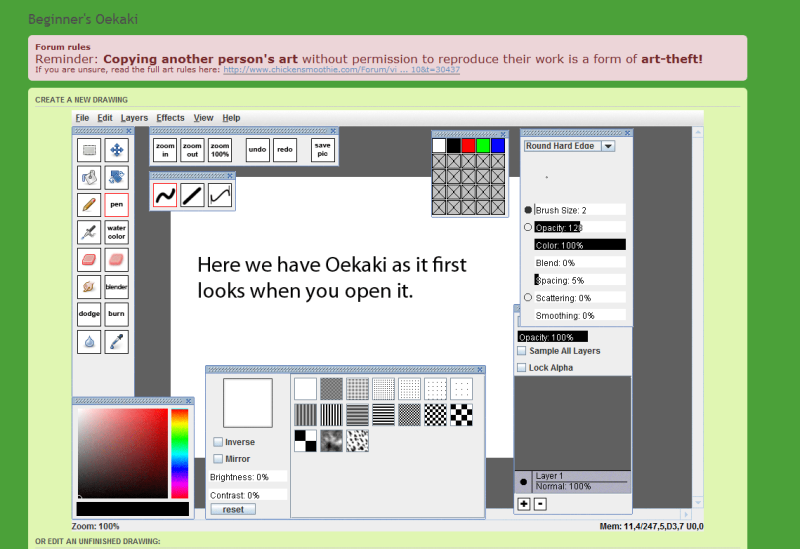
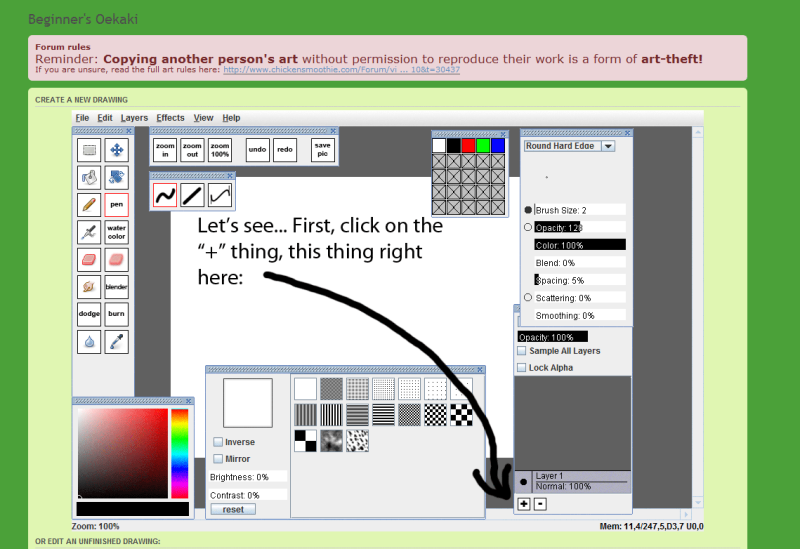
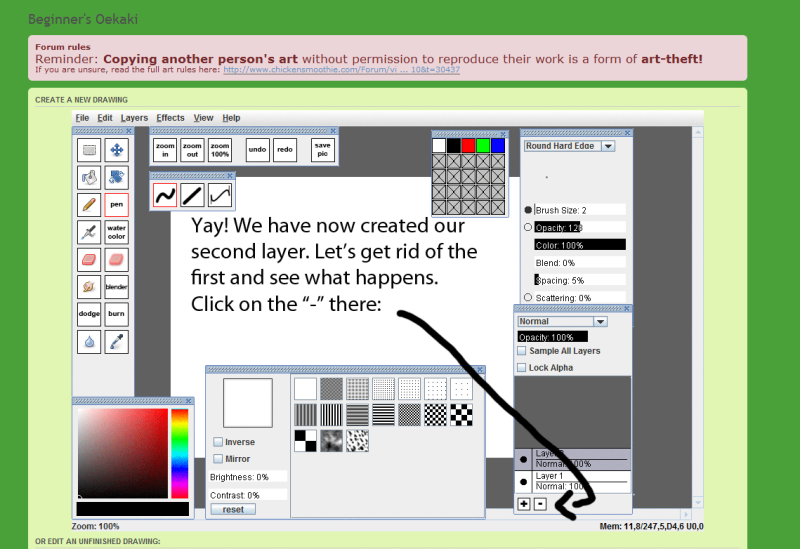
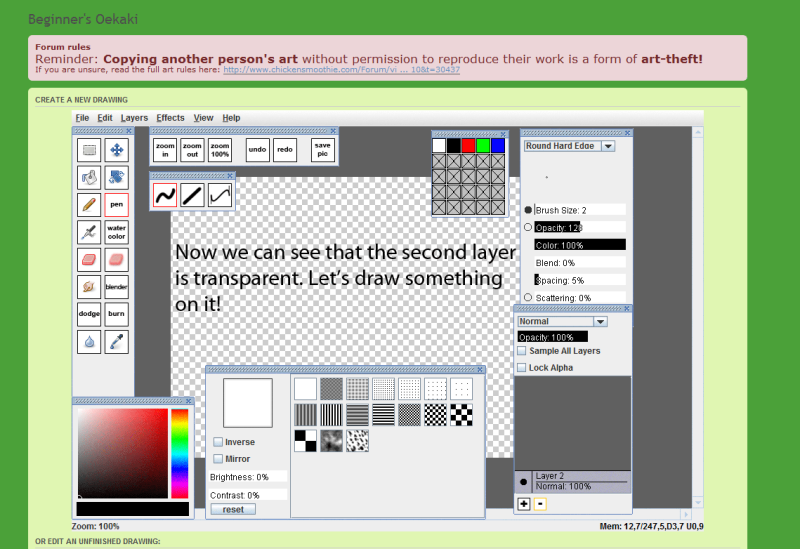
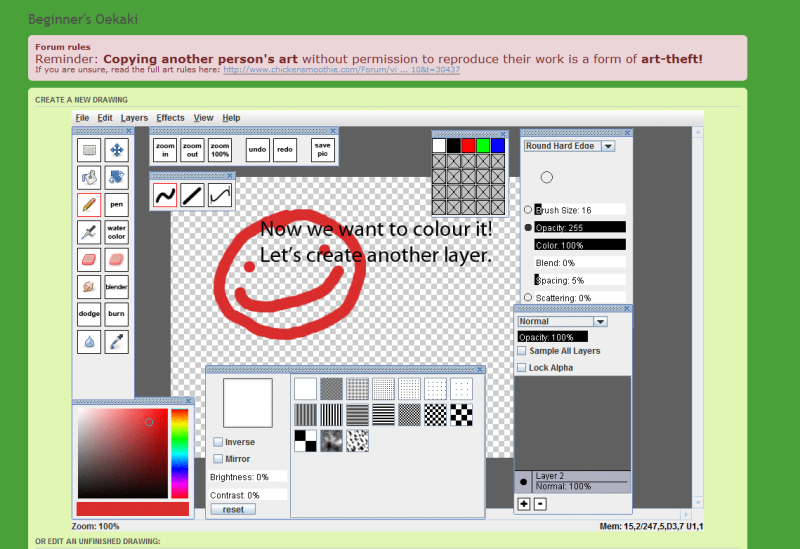
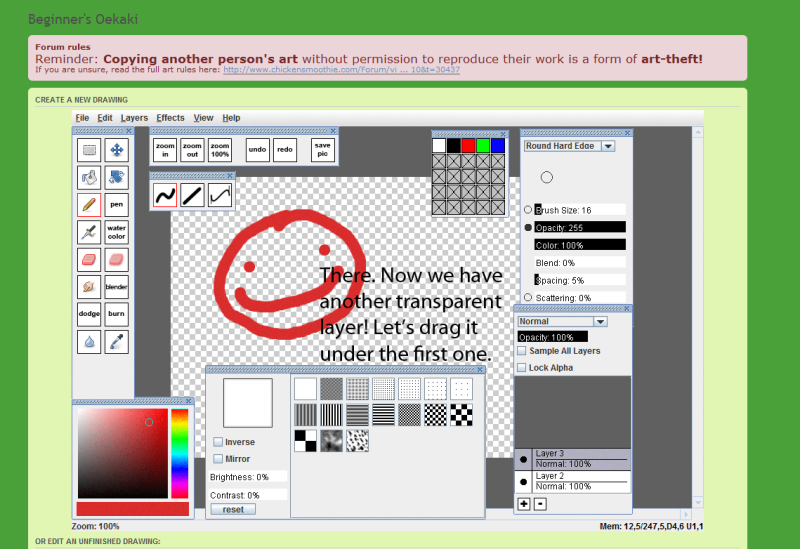
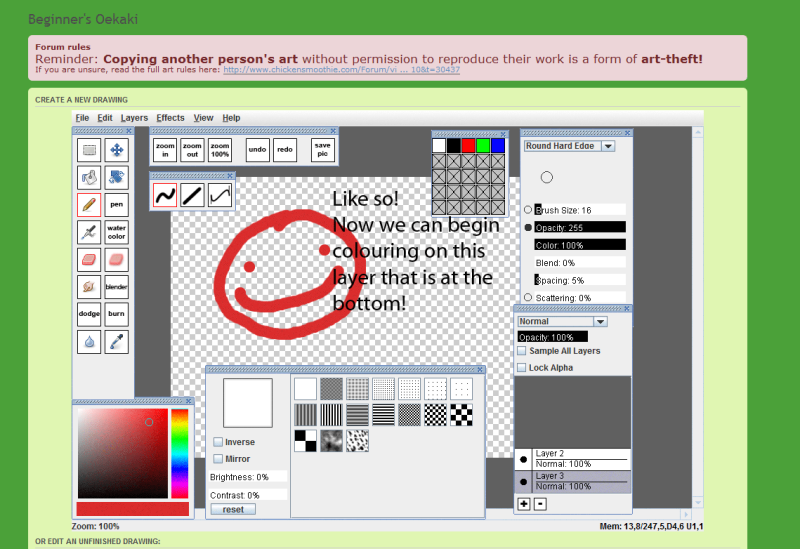
here how you make things transparent
-

Ibuki Mioda - Posts: 11147
- Joined: Tue Nov 29, 2011 3:01 pm
- My pets
- My items
- My wishlist
- My gallery
- My scenes
- My dressups
- Trade with me
4 posts
• Page 1 of 1
Who is online
Users browsing this forum: PuppyCatQueen and 2 guests