
Oekaki/Java problems & solutions
Re: Oekaki/Java problems & solutions
 by gamer » Sat Jan 04, 2025 7:46 am
hi! i've been having an issue with chickenpaint. tablet is Huion HS611, browser is firefox, and i've tried uninstalling and reinstalling drivers.

it only happens in chickenpaint, not other drawing programs i have, but when i'm drawing, it'll often place these weird dots before or after strokes. pressure and everything works fine otherwise. it seems like it's hard for it to detect movement, so i can't make short lines or it doesn't draw at all. anyone else having this issue or know a fix?
it only happens in chickenpaint, not other drawing programs i have, but when i'm drawing, it'll often place these weird dots before or after strokes. pressure and everything works fine otherwise. it seems like it's hard for it to detect movement, so i can't make short lines or it doesn't draw at all. anyone else having this issue or know a fix?

-

gamer - Posts: 5175
- Joined: Thu Oct 13, 2011 9:09 pm
- My pets
- My items
- My wishlist
- My gallery
- My scenes
- My dressups
- Trade with me
Re: Oekaki/Java problems & solutions
by MustangKnight » Sat Jan 25, 2025 5:13 am
Last night I booted up my Oekaki and the Tools Options and the editing(undo, redo, zooms, etc.) were blanked out and just pure white. I refreshed the page and they popped up normal again… after booting it up today, it’s blanked out again. And no matter what I do it doesn’t fix itself. Is there a fix I’m missing? Or are others having this problem?

** Edit ** I tried it on another picture and it loaded right. So I tried it again and it was visible ^^’
** Edit ** I tried it on another picture and it loaded right. So I tried it again and it was visible ^^’
Find me anywhere
@LoukiPoko
@LoukiPoko
-

MustangKnight - Posts: 2001
- Joined: Fri Apr 29, 2011 8:09 am
- My pets
- My items
- My wishlist
- My gallery
- My scenes
- My dressups
- Trade with me
Re: Oekaki/Java problems & solutions
by BlueEyedKite » Thu Jan 30, 2025 3:49 am
This is an announcement for chrome users
Hello c: my friend Ant discovered this technique. I have less things go wrong in oekaki when I do these steps. I now do these steps every session in oekaki:
In chrome click on Settings
Then click on System
Then toggle off then toggle on "Use graphics acceleration when available"
Maybe it's superstition and this does nothing really, but I noticed my tablet throws less dots in oekaki when I take these steps <3

-

BlueEyedKite - Posts: 13624
- Joined: Thu May 28, 2009 9:38 am
- My pets
- My items
- My wishlist
- My gallery
- My scenes
- My dressups
- Trade with me
Re: Oekaki/Java problems & solutions
by maculata » Mon Mar 24, 2025 9:18 am
gamer wrote:hi! i've been having an issue with chickenpaint. tablet is Huion HS611, browser is firefox, and i've tried uninstalling and reinstalling drivers.
it only happens in chickenpaint, not other drawing programs i have, but when i'm drawing, it'll often place these weird dots before or after strokes. pressure and everything works fine otherwise. it seems like it's hard for it to detect movement, so i can't make short lines or it doesn't draw at all. anyone else having this issue or know a fix?
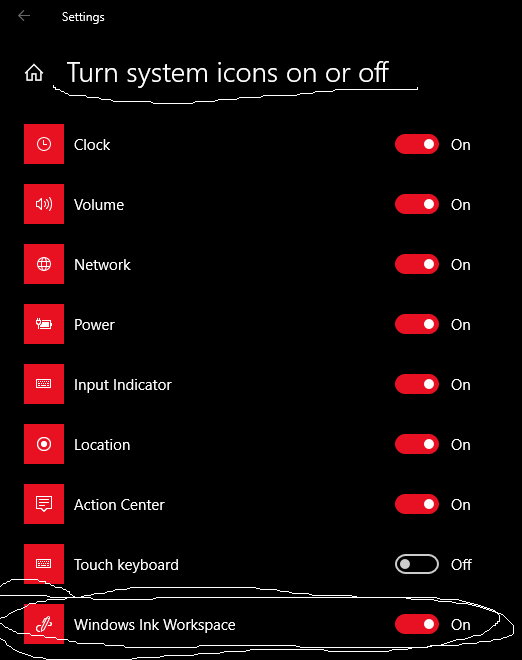
been having this issue and it's only gotten worse for me. cannot figure it out. firefox with a wacom intuos. only thing that helped is searching "Turn system Icons.." in windows (10 for me) and turning on windows ink icon
-

maculata - Posts: 7284
- Joined: Fri Dec 04, 2009 11:28 pm
- My pets
- My items
- My wishlist
- My gallery
- My scenes
- My dressups
- Trade with me
Re: Oekaki/Java problems & solutions
by jjb_123 » Mon Jun 09, 2025 8:19 am
Do I have to pay to use an outline or can I use it for free?
I love caterpillars, squids and cocoons.

 I always except trades for more of these guys! Shoot me a trade, if you want to!

 I always except trades for more of these guys! Shoot me a trade, if you want to!
-

jjb_123 - Posts: 686
- Joined: Mon Dec 09, 2024 11:53 am
- My pets
- My items
- My wishlist
- My gallery
- My scenes
- My dressups
- Trade with me
Re: Oekaki/Java problems & solutions
by Desmond » Mon Jun 09, 2025 10:24 am
jjb_123 wrote:Do I have to pay to use an outline or can I use it for free?
There aren't many that require payment to color in; those that do are not usually in the Editable Oekakis, they're found somewhere that allows the artist to control who colors and who doesn't.
Just pay attention to the rules for the Editables you pick to color in, and abide by them. :)


-

Desmond - Oekaki Moderator
- Posts: 17811
- Joined: Tue Mar 24, 2009 1:59 pm
- My pets
- My items
- My wishlist
- My gallery
- My scenes
- My dressups
- Trade with me
Re: Oekaki/Java problems & solutions
by jjb_123 » Tue Jun 10, 2025 11:11 am
is there a way to turn off pressure? it's really bugging me when I try to draw.
I love caterpillars, squids and cocoons.
I always except trades for more of these guys! Shoot me a trade, if you want to!
I always except trades for more of these guys! Shoot me a trade, if you want to!-
jjb_123 - Posts: 686
- Joined: Mon Dec 09, 2024 11:53 am
- My pets
- My items
- My wishlist
- My gallery
- My scenes
- My dressups
- Trade with me
Re: Oekaki/Java problems & solutions
by ☼ avalon » Tue Jun 10, 2025 11:37 am
jjb_123 wrote:is there a way to turn off pressure? it's really bugging me when I try to draw.
- if you press the circle next to "brush size" to be empty, it should turn off the pen pressure!
-

☼ avalon - Posts: 1848
- Joined: Mon Mar 29, 2021 6:36 am
- My pets
- My items
- My wishlist
- My gallery
- My scenes
- My dressups
- Trade with me
Re: Oekaki/Java problems & solutions
by Foxghost » Sat Jul 12, 2025 11:37 am
Hi! I am extremely confused as to what's happening. Every time I go to use my tablet on oekaki my brush/cursor stutters? And becomes unresponsive in random intervals. It sometimes sends my lines across the canvas because it's not registering my movement properly. I use a Huion Kamvas Pro 16, my computer uses Windows 11, my browser is Firefox, I use ChickenPaint V.2.0, and everything on my computer is up to date as of an hour ago. I restarted my computer already, and my tablet works just fine in every other program. It's preventing me from being able to draw at all.
Edit: found the issue! I had recently updated to Windows 11 and Windows 11 decided to randomly turn on a weird windows pen setting I never wanted! Ugh lol
Edit: found the issue! I had recently updated to Windows 11 and Windows 11 decided to randomly turn on a weird windows pen setting I never wanted! Ugh lol

Bʀʏ/Fᴏx ☆ Hᴇ/Tʜᴇʏ ☆ Mʏ Pᴀʀᴛɴᴇʀ ☆ Iᴄᴏɴ Cʀᴇᴅɪᴛ ☆ Sɪɢ Cʀᴇᴅɪᴛ
↻ ◁ || ▷ ↺ [ PLAYING NOW: r.i.p. - margø ] ▁ ▂ ▃ ▄ ▅ ▆ █ 100 %
-

Foxghost - Posts: 6636
- Joined: Fri Jul 20, 2018 1:05 pm
- My pets
- My items
- My wishlist
- My gallery
- My scenes
- My dressups
- Trade with me
Re: Oekaki/Java problems & solutions
by Akkela » Mon Jul 28, 2025 11:43 am
Hi! I've never used Oekaki before and I was just wondering if there's a way to insert images into Oekaki on mobile?
-

Akkela - Posts: 407
- Joined: Sat Jan 13, 2024 11:25 am
- My pets
- My items
- My wishlist
- My gallery
- My scenes
- My dressups
- Trade with me
Who is online
Users browsing this forum: No registered users and 1 guest