
How to make a sigbox
How to make a sigbox
 by eliethewolf » Sun Aug 22, 2010 3:02 pm
Since I've seen so many people asking how to make a sigbox or imagemap I thought I'd post a little tutorial. Brushes used are by Aka-Joe on Deviantart.
To make one you'll need an image host (photobucket, tinypic, imageshack, etc), and an art program (GIMP, Photoshop, etc).
First you start with an image. For this example I'll use a picture of my fursona, Elie.
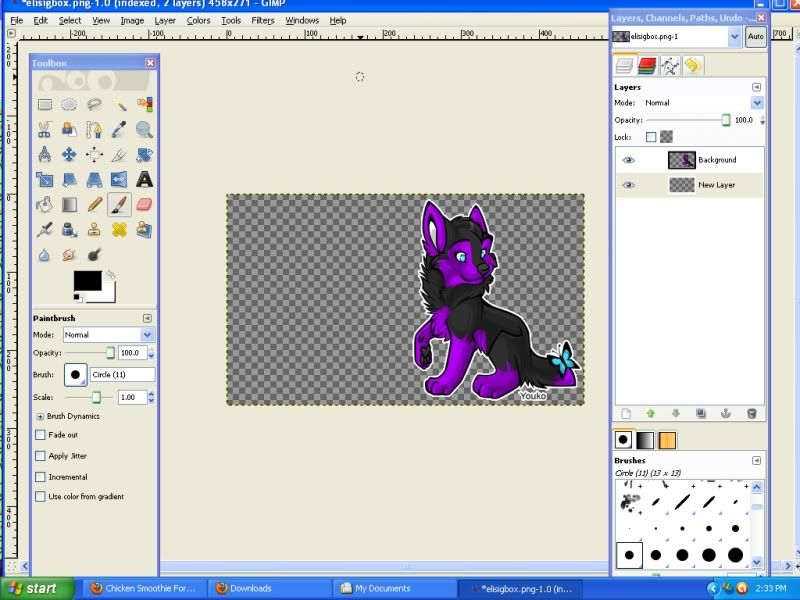
Open the image in your art program. I use GIMP because it's free. Make sure you make the canvas size the size and shape you want the sigbox to be. To fit in your signature you want it to be a medium rectangle. Example
Now you can decorate the image however you want to. You can use brushes to add designs and make it pretty. I make a separate layer underneath my base image for the decorations. Example
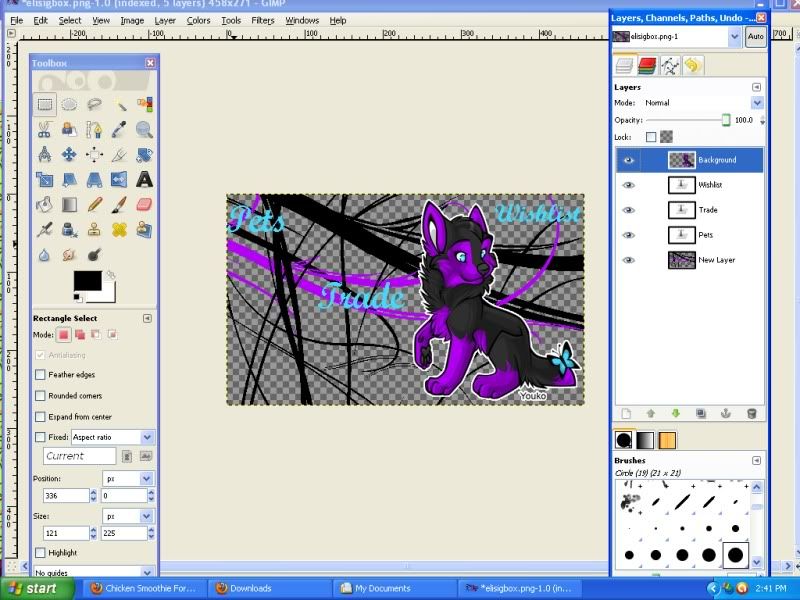
Then you add the text. You want to make each word have its own vertical space because you are going to be splitting the image vertically. For this one I just used pets, trade and wishlist. Example
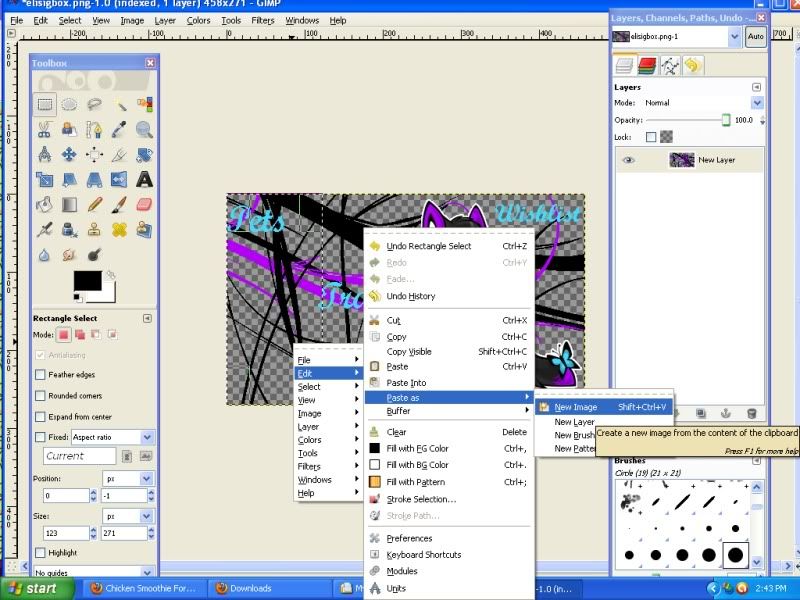
Then you merge all the layers together. Save the whole image now, in case you mess up. Now you split the image into pieces. You don't want any space between the pieces or it won't look right. Each word has its own piece. Make the piece with the rectangle tool, copy and then "paste as new image". Save the new image (Save as a .png if there is transparency) and go back to the old one. Right where the old piece ends, use the rectangle tool to make a new piece and repeat for each word. Example
Now upload each piece to your image host account.
Now is the easy part. You just treat each piece as an image link. So for the first piece I'd write
and repeat for each piece.
So it ends up looking like this



Hope that helped.
To make one you'll need an image host (photobucket, tinypic, imageshack, etc), and an art program (GIMP, Photoshop, etc).
First you start with an image. For this example I'll use a picture of my fursona, Elie.
Open the image in your art program. I use GIMP because it's free. Make sure you make the canvas size the size and shape you want the sigbox to be. To fit in your signature you want it to be a medium rectangle. Example
Now you can decorate the image however you want to. You can use brushes to add designs and make it pretty. I make a separate layer underneath my base image for the decorations. Example
Then you add the text. You want to make each word have its own vertical space because you are going to be splitting the image vertically. For this one I just used pets, trade and wishlist. Example
Then you merge all the layers together. Save the whole image now, in case you mess up. Now you split the image into pieces. You don't want any space between the pieces or it won't look right. Each word has its own piece. Make the piece with the rectangle tool, copy and then "paste as new image". Save the new image (Save as a .png if there is transparency) and go back to the old one. Right where the old piece ends, use the rectangle tool to make a new piece and repeat for each word. Example
Now upload each piece to your image host account.
Now is the easy part. You just treat each piece as an image link. So for the first piece I'd write
- Code: Select all
[url="link to my pets"][img]Link to my image[/img][/url]
and repeat for each piece.
So it ends up looking like this
Hope that helped.
Thanks for the memories!
-

eliethewolf - Posts: 1497
- Joined: Wed Oct 08, 2008 1:42 pm
- My pets
- My items
- My wishlist
- My gallery
- My scenes
- My dressups
- Trade with me
Re: How to make a sigbox
by cafemochi » Tue Aug 24, 2010 6:19 am
AWESome!
b
︵‿︵‿୨♡୧‿︵‿︵
amari/mochi⎟ she/her

- epps cat collector! look at all my cats! -
click images for credit!
✧ fr: dragons⎟ comms: closed⎟ trades: open ✧
︵‿︵‿୨♡୧‿︵‿︵
amari/mochi⎟ she/her
- epps cat collector! look at all my cats! -
click images for credit!
✧ fr: dragons⎟ comms: closed⎟ trades: open ✧


-

cafemochi - Posts: 8732
- Joined: Sun Feb 21, 2010 7:18 am
- My pets
- My items
- My wishlist
- My gallery
- My scenes
- My dressups
- Trade with me


-

BadDogAlliance - Posts: 5486
- Joined: Wed Jan 13, 2010 12:24 pm
- My pets
- My items
- My wishlist
- My gallery
- My scenes
- My dressups
- Trade with me
Re: How to make a sigbox
by sylphland » Thu Aug 26, 2010 9:05 pm
Elie, you have just saved my life! Thank you so much <3
yeehaw wrote:♥{*Gallery*}♥
--
ALEX // UK // NB [they/she/he]
I'm an illustrator & i mainly visit here to doodle every now and then ♥
-

sylphland - Posts: 2019
- Joined: Sun Sep 27, 2009 8:56 am
- My pets
- My items
- My wishlist
- My gallery
- My scenes
- My dressups
- Trade with me
Re: How to make a sigbox
by eliethewolf » Sat Aug 28, 2010 6:17 am
Hahaha, glad to help. 
Thanks for the memories!
-
eliethewolf - Posts: 1497
- Joined: Wed Oct 08, 2008 1:42 pm
- My pets
- My items
- My wishlist
- My gallery
- My scenes
- My dressups
- Trade with me
Re: How to make a sigbox
by BadDogAlliance » Tue Aug 31, 2010 7:59 am
can we use this sites drawing program
-
BadDogAlliance - Posts: 5486
- Joined: Wed Jan 13, 2010 12:24 pm
- My pets
- My items
- My wishlist
- My gallery
- My scenes
- My dressups
- Trade with me
Re: How to make a sigbox
by DisabledLlama » Tue Aug 31, 2010 8:37 pm
WolfWarrior wrote:can we use this sites drawing program
Not if you want it to have a transparent background. You'd need to use an external program to split the image up anyway.






My lil Snoodly Boop


-

DisabledLlama - Posts: 3216
- Joined: Sat Aug 01, 2009 5:04 pm
- My pets
- My items
- My wishlist
- My gallery
- My scenes
- My dressups
- Trade with me
Re: How to make a sigbox
by sylphland » Tue Aug 31, 2010 8:56 pm
You can erase the white layer on the oekaki and it will be transparent 
yeehaw wrote:♥{*Gallery*}♥
--
ALEX // UK // NB [they/she/he]
I'm an illustrator & i mainly visit here to doodle every now and then ♥
-
sylphland - Posts: 2019
- Joined: Sun Sep 27, 2009 8:56 am
- My pets
- My items
- My wishlist
- My gallery
- My scenes
- My dressups
- Trade with me
Re: How to make a sigbox
by BadDogAlliance » Wed Sep 01, 2010 7:16 am
kk I think I get it....then I can use paint on top of that right
-
BadDogAlliance - Posts: 5486
- Joined: Wed Jan 13, 2010 12:24 pm
- My pets
- My items
- My wishlist
- My gallery
- My scenes
- My dressups
- Trade with me
Re: How to make a sigbox
by Ultimate_Aero » Thu Sep 02, 2010 9:47 pm
This is such a good guide!I will get one soon,do you have any places you'd recomend to get a sig box made?


-

Ultimate_Aero - Posts: 23
- Joined: Thu Feb 11, 2010 3:04 pm
- My pets
- My items
- My wishlist
- My gallery
- My scenes
- My dressups
- Trade with me
Who is online
Users browsing this forum: No registered users and 1 guest