
Editable avatars
Oekaki posts must follow our Rules for the Site and Forum,
including the Oekaki Rules and Art Rules.
Having trouble using oekaki? Check out the Oekaki Guide or send in a help ticket.
-
- Gallery display:


|
♥ Free Plumerian Avatar ♥
Dear plumerian fans,
Today I have decided to make some plumie line-art. Enjoy! - Lin♥ (_gardenGnostic) Rules: • Don't steal art; keep my signature. • DO NOT create your own plumie here!! • Only make an avatar for a plumie that you own. • Don't be rude, don't criticize mine and other peoples artwork. • Marking is allowed, so is bumping. Although it's not necessary. • You can make as many avatars as you want (however refer to rules #2+3). • 100% FREEEE!! Have fun guys!! |
|
prisms @ Tue Feb 03, 2015 8:28 am
mark ;3;
|
|
elyx @ Tue Feb 03, 2015 9:33 am mark ♥ |
|
nervousnickel @ Tue Feb 03, 2015 9:46 am
Oh this is cute! I'll definitely be coloring in later!
|


|
KILL IT
Everyone's favorite dress, MYSTERY! Make sure people know you hate the conflict of Gold And White And Blue And Black with this avatar! |
|
❉Pink Gems❉ @ Fri Mar 06, 2015 3:41 pm Or, just fill it in and make it Is This Dress ____ and _____ or ____ and ____? |


|
Cat Head Avatar
This is a free editable avatar. Feel free to cover this however many times you want. Color where it says Lock Alpha and you shouldn't have to worry about going out of the lines. Please follow my rules. RULES 1.) Please no claiming my lines
2.) Please no removing my signature 3.) Follow site rules 4.) This is to not be used for profit/gain. This is only for YOUR use. 5.) You may take these off site but give me credit |

|
Warrior Cat Avatar
Color this cat in! |
|
sapphire77 @ Sun Feb 08, 2015 2:30 am Bump |
|
sapphire77 @ Wed Mar 04, 2015 8:26 am Bump |

|
Hangin' In There!
This was supposed to be a cutesy little doodle,
then I thought 'Hey! Maybe people want this as a avatar!  '. '.So... now you can use it XD Rules-/-Edits [*]Minor edits like... collars, bracelets, tattoos, claws, horns, hair. [*]Any colors are allowed really XD [*]Do not change the original base, or my signature please. (I'll ban you if you do >:D) |
|
Decca @ Tue Aug 12, 2014 3:32 pm
Aha, this is quite amusing! ^^ |
|
r.ddler @ Tue Aug 12, 2014 4:07 pm Definitely here to amuse, and cheer up. |
|
r.ddler @ Thu Aug 14, 2014 6:24 am le bump |

|
Wolf expressions avatar
Yey! An avatar! |

|
Editable LIFE/Death Animated Patrick Avatar
I made this Editable Patrick Avatar with him flipping the light switch on and off.  This is free of use, and below I have rules for using it and how to make it animated. ~Rules~ Please don't take this off-site! Don't remove my siggy. Please don't make line edits. Feel free to add accessories to Pinhead Patrick. Don't claim it as your own. Make him colorful! How to animate your avatar! Step 1: First, color in Patrick's pants/body using the layers already activated. Also, color in the "ON" light bulb (under Extras) and ON Light Switch if you want. Step 2: Save and post the Oekaki. Step 3: Right click the 100x100 picture and save it to your desktop as "Patrick Slide 1". Step 4: Hit "Color me in" on your Patrick avatar. Step 5: Turn off all the layers under "First Slide", then turn on all the layers under "Second Slide". Make sure to turn off the ON Light bulb under Extras and turn on the OFF Lightbulb! Step 6: Repeat Steps 1-3, except when saving it, save it as "Patrick Slide 2". Step 7: Go to here: https://imgflip.com/images-to-gif Step 8: Upload both pictures, then set the speed to whatever you like. Step 9: Save it, copy the URL, and use it as your avatar! Example of a non-colored in Gif: 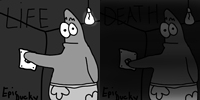 YOU LIAR, MR. TIMER. |
|
Nat! @ Tue Dec 16, 2014 1:23 pm
^3^ 8/8, rlly gr8 m8. |
|
Antipathy @ Thu Dec 18, 2014 5:25 am
Thanks! |
|
consumptivefawn @ Sun Feb 15, 2015 12:58 pm Will be coloring ^^ |

|
not my lines, but soo soo cute!!!
based on this drawing by モグラ
|

|
Snow's free editable avatar canvas!
based on this drawing by FallingFlower Here you all go! Just remember to use the Lock Alpha when coloring. |
|
Tayrisha @ Wed Dec 11, 2013 8:21 am
I´ll color when I get time. ^^
|
|
Neutral Middle @ Mon Sep 01, 2014 4:14 am Marks |
|
corrosive_limes @ Fri Feb 27, 2015 1:43 pm mark |


|
Free Deer Color-In
|

|
Sethh @ Sat Jan 25, 2014 11:43 am
Omg cute! |
|
chunkypeanutbutter @ Sat Jan 25, 2014 4:32 pm
thank you uvu
|
|
catra @ Sat Jan 25, 2014 4:32 pm Love it! |

|
EDITABLE DOG AVATAR
You Can Edit Please!!! Everyone can edit! |
|
she wolf warrior @ Tue Feb 24, 2015 11:39 pm I will! Marking. |
|
average. @ Wed Feb 25, 2015 3:22 am
what can't you do, SWW?  (my audience) (my audience)
|


|
wolf avatar
ouo hope you enjoy |
|
The Safe Haven @ Tue Aug 05, 2014 10:02 am i love this ! |
|
I♫dream♪in♬harmonies @ Tue Aug 05, 2014 10:02 am Whoooa this is so good! |
|
KaiKenNatsuki @ Thu Aug 07, 2014 12:50 pm Thank you! Glad you like it ouo |

|
Paw print..
Make it say whatever you want it to |

|
Wolf Lineart
First lineart I've done.
I would love some tips on how to make an official lineart. My layers are all over the place. Enjoy I guess! For a first try on this Oekaki, I'm kinda proud. |

|
Wolf Avatar
I made my first Editable Avatar Oekaki! Rules *You can edit the lines, BUT you can only edit these things... -The Ears -The Mouth -The Eyes -The Hair (the extra hair on its head, you can add more hair or take the hair away) *You must give me credit *Only use on Chicken Smoothie *All Tess Rules apply *Use Lock Alpha *You must leave my signature |
 )
) 
|
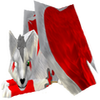
Wolf Avatar
Just a wolf avatar I whipped up. |

|
Panting Dog Base
Yup, here ya go! It sucks, but ya. I'll make a new, better one when I get more advanced, I promise! ;u; _____________________________ Example...
 1 Give me credit 2 Don't erase me signature 3 You can edit the lines but not too much 3 Have fun! |
|
♠Diamond Ace♠ (¬‿¬) @ Fri Feb 20, 2015 9:43 am Omg! I love it! Its beautiful!!! |
|
vulpes vulpes @ Fri Feb 20, 2015 12:50 pm
Daww, no it's not... ;u; Thank you! |

|
eye avatar editable
Please color this! |
|
sashiyaki @ Thu Feb 19, 2015 10:46 am I made one :3 |
Who is online
Users browsing this forum: No registered users and 1 guest
Forum permissions
You cannot post new topics in this forum
You cannot reply to topics in this forum
You cannot edit your posts in this forum
You cannot delete your posts in this forum
You cannot post attachments in this forum